
'board_android-IoT'에 해당되는 글 87건
- 2024.10.29 :: Compile on both ESP32 and ESP8266
- 2024.10.29 :: STM Flash loader 1
- 2024.10.12 :: Keil, uVision , Compile size check
- 2024.09.20 :: LTE modem sample
- 2024.09.10 :: ESP32 UDP SEND_RECV example
- 2024.09.06 :: ESP32 UDP SEND_RECV example
-
#if defined(ESP8266)
#pragma message "ESP8266 stuff happening!"
#elif defined(ESP32)
#pragma message "ESP32 stuff happening!"
#else
#error "This ain't a ESP8266 or ESP32, dumbo!"
#endif
https://community.platformio.org/t/compile-on-both-esp32-and-esp8266/14356
Compile on both ESP32 and ESP8266
what is the best way to #ifdef ESP32 and #ifdef ESP8266 is there some variable I can use to ifdef some part of the code in case using esp8266 and some part in case I use esp32? thanks
community.platformio.org
'board_android-IoT > ESP32' 카테고리의 다른 글
| ESP32 응용 제품 (0) | 2025.03.26 |
|---|---|
| ESP32-S3-A7670E-4G , Developement environment (0) | 2024.11.28 |
| ESP32 UDP SEND_RECV example (0) | 2024.09.10 |
| ESP32 UDP SEND_RECV example (0) | 2024.09.06 |
| ESP8266 , DB18B20 connection (0) | 2024.07.29 |
-
STM32F429I-DISC1 보드의 MCU 내장 Bootloader를 이용한 펌웨어 다운로드 - 2
안녕하세요? 땜쓰 전자연구소의 소장 땜쓰입니다. 이번 포스팅에서는 지난 포스팅인 "STM32F429I...
blog.naver.com
-
https://www.st.com/en/development-tools/flasher-stm8.html
FLASHER-STM8 - STMicroelectronics
FLASHER-STM8 - STM8 Flash loader demonstrator (UM0462), FLASHER-STM8, STMicroelectronics
www.st.com
'board_android-IoT > STM32F' 카테고리의 다른 글
| Keil compiler printf(with uart) 하기 (0) | 2025.02.20 |
|---|---|
| Keil compiler printf(with uart) 하기 (0) | 2025.02.18 |
| Keil, uVision , Compile size check (0) | 2024.10.12 |
| LTE modem sample (0) | 2024.09.20 |
| SWO (Serial Wire Output) setting (2) | 2024.07.23 |
- Keil, uVision5 , how to check compile code size limit check
> Flash size: Code + RO-data + RW-data
#W7500_compile_size_check #STM32_compile_size_check #W7500
| 컴파일 데이타배치 Program Size: Code=10608 RO-data=268 RW-data=80 ZI-data=1632 컴파일하면 결과가 이럻게 나오는데 싸이즈 1. ZI Data: Zero Initialized Data 2. RO Data are the constants. Total RAM Size = RW Data + ZI Data Total ROM Size = Code + RO Data + RW Data |
https://blog.naver.com/gauya/220129979980
Keil, uVision5
- 컴파일 데이타배치 Program Size: Code=10608 RO-data=268 RW-data=80 ZI-data=1632 &nb...
blog.naver.com

'board_android-IoT > STM32F' 카테고리의 다른 글
| Keil compiler printf(with uart) 하기 (0) | 2025.02.18 |
|---|---|
| STM Flash loader (1) | 2024.10.29 |
| LTE modem sample (0) | 2024.09.20 |
| SWO (Serial Wire Output) setting (2) | 2024.07.23 |
| Porting STM32F1 Firmware to STM32F4 (0) | 2024.07.20 |
- 개발보드:
GSM 모듈 개발 코어 보드 TTL 직렬 포트 포함, A7670E, A7670SA, A7670G, A7672S, 4G Cat 1 - AliExpress 30
Smarter Shopping, Better Living! Aliexpress.com
ko.aliexpress.com
- 비교
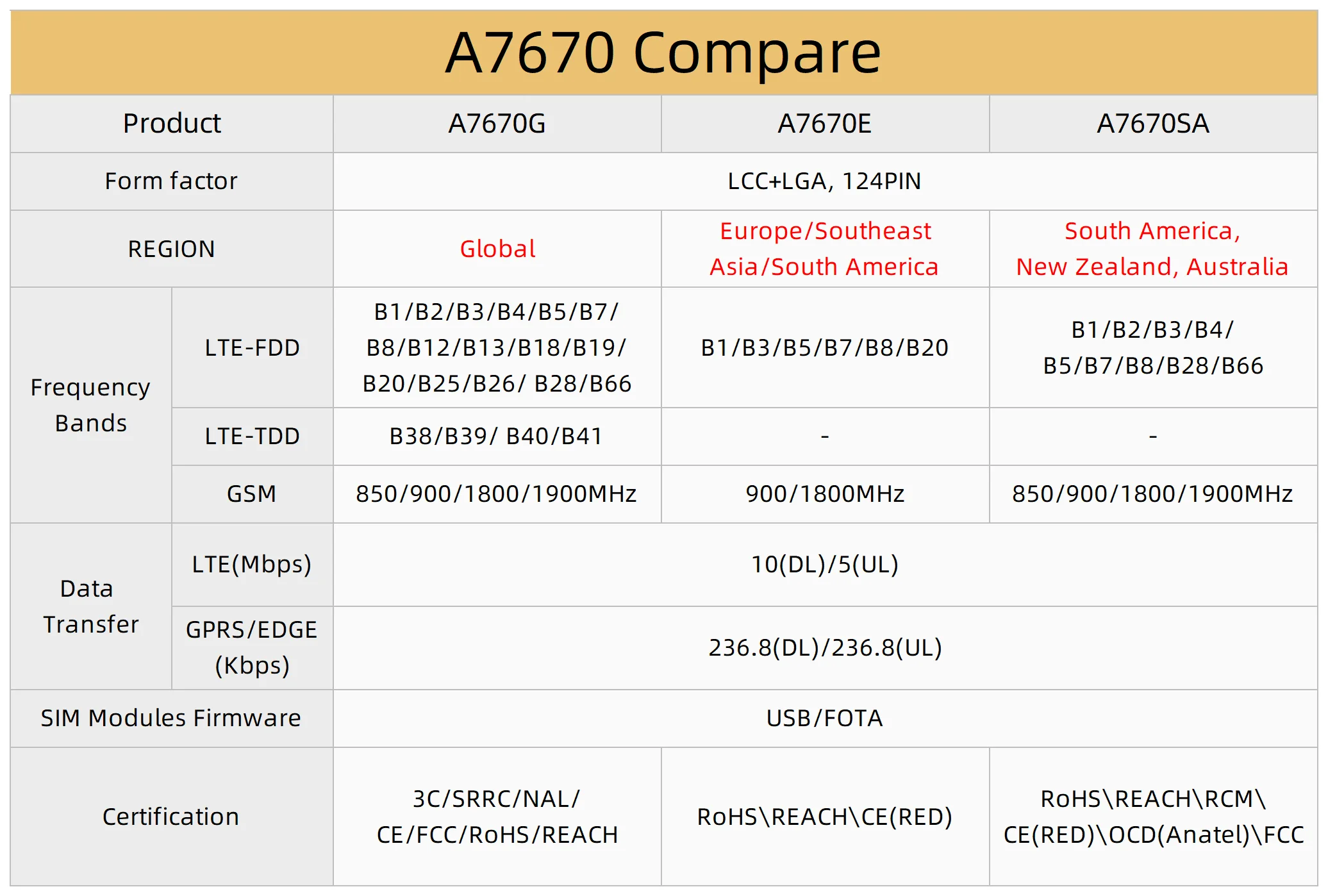
Github 링크:
https://github.com/Xinyuan-LilyGO/LilyGO-T-A7670X
GitHub - Xinyuan-LilyGO/LilyGO-T-A76XX: LilyGo A7670X A7608X SIM7670G series
LilyGo A7670X A7608X SIM7670G series. Contribute to Xinyuan-LilyGO/LilyGO-T-A76XX development by creating an account on GitHub.
github.com
-
LILYGO® TTGO T-A7670G/E/SA R2 4G 개발 보드 LTE CAT1 SIM 모듈 ESP32 지원 GSM/GPRS/EDGE TF 카드 A7670G A7670E A7670SA -
Smarter Shopping, Better Living! Aliexpress.com
ko.aliexpress.com
- 기존모뎀:
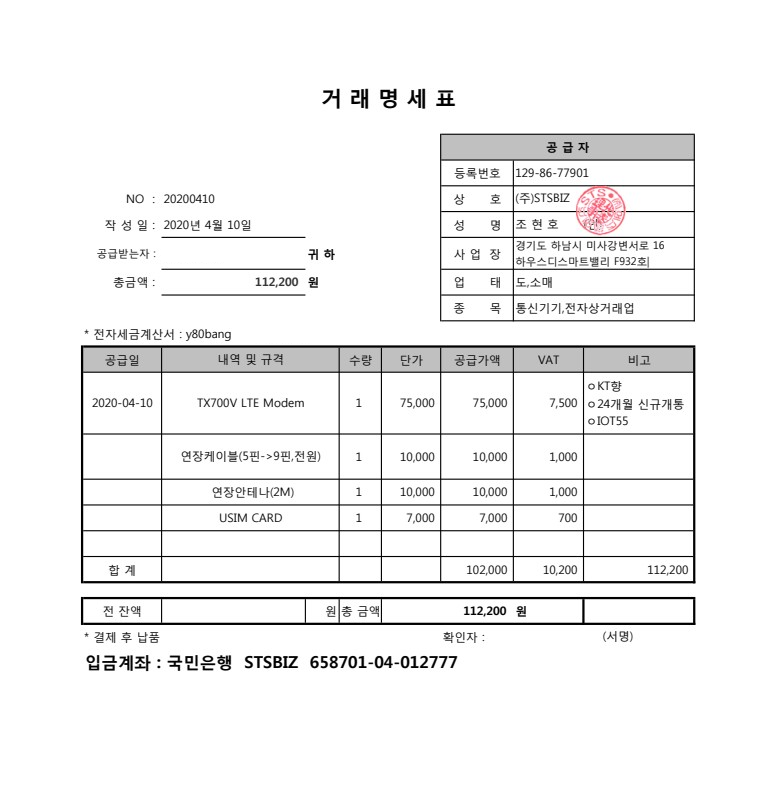
-
'board_android-IoT > STM32F' 카테고리의 다른 글
| STM Flash loader (1) | 2024.10.29 |
|---|---|
| Keil, uVision , Compile size check (0) | 2024.10.12 |
| SWO (Serial Wire Output) setting (2) | 2024.07.23 |
| Porting STM32F1 Firmware to STM32F4 (0) | 2024.07.20 |
| CS5480 - Voltage, Current RMS calculation IC (0) | 2024.07.10 |
- ESP32 - Arduino source
| /* * This sketch sends random data over UDP on a ESP32 device * */ #include <WiFi.h> #include <NetworkUdp.h> /* 8:28:24.965 -> entry 0x403c98ac 18:28:25.120 -> Connecting to WiFi network: Csk6457 18:28:25.214 -> Waiting for WIFI connection... 18:28:25.297 -> WiFi connected! IP address: 192.168.43.217 18:28:27.178 -> UDP recv=0 18:28:29.218 -> UDP recv=217 */ // WiFi network name and password: const char *networkName = "Csk6457"; const char *networkPswd = "1q2w3e4r@"; //IP address to send UDP data to: // either use the ip address of the server or // a network broadcast address const char *udpAddress = "192.168.43.1"; //"192.168.0.255"; const int udpPort = 56680; const int localPort = udpPort ; //Are we currently connected? boolean connected = false; //The udp library class NetworkUDP udp; char packetBuffer[255]; void setup() { // Initialize hardware serial: Serial.begin(115200); //Connect to the WiFi network connectToWiFi(networkName, networkPswd); } int packetSize ; unsigned long testIDPrev ; unsigned long interval = 2000 ; //2000= 2 seconds void loop() { //only send data when connected if (connected) { unsigned long testID = millis(); if( testID - testIDPrev >= interval ){ testIDPrev = testID ; //Send a packet udp.beginPacket(udpAddress, udpPort); udp.printf("Since boot: %lu(ms)\n", millis() ); // millis() / 1000); udp.endPacket(); // receive packets packetSize = udp_readPackets() ; } } //Wait for 2 second //delay(2000); } int packetSizePrev ; int udp_readPackets() { int packetSize ; packetSize = udp.parsePacket(); if (packetSize> 0 ) { Serial.print(" Received packet from : "); Serial.println(udp.remoteIP()); Serial.print(" Size : "); Serial.println(packetSize); int len = udp.read(packetBuffer, 255); if (len > 0) packetBuffer[len - 1] = 0; Serial.printf("[client<-server]Recv Data: %s\n", packetBuffer); } if( packetSize != packetSizePrev ) { packetSizePrev = packetSize ; Serial.printf("UDP recv=%d\n", packetSize) ; } return packetSize ; } void connectToWiFi(const char *ssid, const char *pwd) { Serial.println("Connecting to WiFi network: " + String(ssid)); // delete old config WiFi.disconnect(true); //register event handler WiFi.onEvent(WiFiEvent); // Will call WiFiEvent() from another thread. //Initiate connection WiFi.begin(ssid, pwd); Serial.println("Waiting for WIFI connection..."); } // WARNING: WiFiEvent is called from a separate FreeRTOS task (thread)! void WiFiEvent(WiFiEvent_t event) { switch (event) { case ARDUINO_EVENT_WIFI_STA_GOT_IP: //When connected set Serial.print("WiFi connected! IP address: "); Serial.println(WiFi.localIP()); //initializes the UDP state //This initializes the transfer buffer udp.begin(WiFi.localIP(), udpPort); connected = true; udp.begin(localPort); //20240906-1 break; case ARDUINO_EVENT_WIFI_STA_DISCONNECTED: Serial.println("WiFi lost connection"); connected = false; break; default: break; } } |
- 스마트폰에서 ESP32 로 UDP통신을 하는 화면

'board_android-IoT > ESP32' 카테고리의 다른 글
| ESP32-S3-A7670E-4G , Developement environment (0) | 2024.11.28 |
|---|---|
| Compile on both ESP32 and ESP8266 (0) | 2024.10.29 |
| ESP32 UDP SEND_RECV example (0) | 2024.09.06 |
| ESP8266 , DB18B20 connection (0) | 2024.07.29 |
| ESP32 Dev Board DTR/RTS (0) | 2024.06.07 |
- ESP32 - Arduino source
| /* * This sketch sends random data over UDP on a ESP32 device * */ #include <WiFi.h> #include <NetworkUdp.h> /* 8:28:24.965 -> entry 0x403c98ac 18:28:25.120 -> Connecting to WiFi network: Csk6457 18:28:25.214 -> Waiting for WIFI connection... 18:28:25.297 -> WiFi connected! IP address: 192.168.43.217 18:28:27.178 -> UDP recv=0 18:28:29.218 -> UDP recv=217 */ // WiFi network name and password: const char *networkName = "Csk6457"; const char *networkPswd = "1q2w3e4r@"; //IP address to send UDP data to: // either use the ip address of the server or // a network broadcast address const char *udpAddress = "192.168.43.1"; //"192.168.0.255"; const int udpPort = 56680; const int localPort = udpPort ; //Are we currently connected? boolean connected = false; //The udp library class NetworkUDP udp; char packetBuffer[255]; void setup() { // Initialize hardware serial: Serial.begin(115200); //Connect to the WiFi network connectToWiFi(networkName, networkPswd); } int packetSize ; unsigned long testIDPrev ; unsigned long interval = 2000 ; //2000= 2 seconds void loop() { //only send data when connected if (connected) { unsigned long testID = millis(); if( testID - testIDPrev >= interval ){ testIDPrev = testID ; //Send a packet udp.beginPacket(udpAddress, udpPort); udp.printf("Since boot: %lu(ms)\n", millis() ); // millis() / 1000); udp.endPacket(); // receive packets packetSize = udp_readPackets() ; } } //Wait for 2 second //delay(2000); } int packetSizePrev ; int udp_readPackets() { int packetSize ; packetSize = udp.parsePacket(); if (packetSize> 0 ) { Serial.print(" Received packet from : "); Serial.println(udp.remoteIP()); Serial.print(" Size : "); Serial.println(packetSize); int len = udp.read(packetBuffer, 255); if (len > 0) packetBuffer[len - 1] = 0; Serial.printf("[client<-server]Recv Data: %s\n", packetBuffer); } if( packetSize != packetSizePrev ) { packetSizePrev = packetSize ; Serial.printf("UDP recv=%d\n", packetSize) ; } return packetSize ; } void connectToWiFi(const char *ssid, const char *pwd) { Serial.println("Connecting to WiFi network: " + String(ssid)); // delete old config WiFi.disconnect(true); //register event handler WiFi.onEvent(WiFiEvent); // Will call WiFiEvent() from another thread. //Initiate connection WiFi.begin(ssid, pwd); Serial.println("Waiting for WIFI connection..."); } // WARNING: WiFiEvent is called from a separate FreeRTOS task (thread)! void WiFiEvent(WiFiEvent_t event) { switch (event) { case ARDUINO_EVENT_WIFI_STA_GOT_IP: //When connected set Serial.print("WiFi connected! IP address: "); Serial.println(WiFi.localIP()); //initializes the UDP state //This initializes the transfer buffer udp.begin(WiFi.localIP(), udpPort); connected = true; udp.begin(localPort); //20240906-1 break; case ARDUINO_EVENT_WIFI_STA_DISCONNECTED: Serial.println("WiFi lost connection"); connected = false; break; default: break; } } |
- 스마트폰에서 ESP32 로 UDP통신을 하는 화면
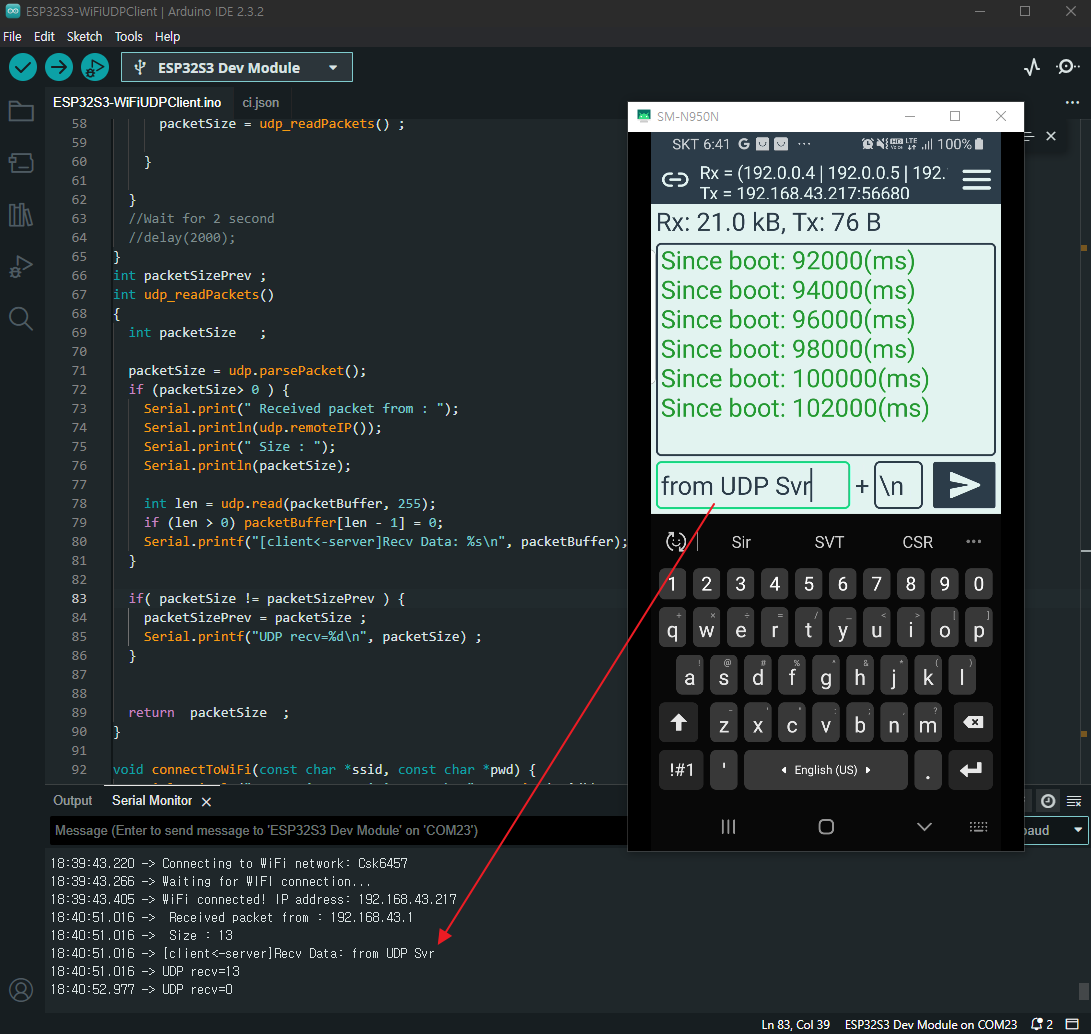
'board_android-IoT > ESP32' 카테고리의 다른 글
| Compile on both ESP32 and ESP8266 (0) | 2024.10.29 |
|---|---|
| ESP32 UDP SEND_RECV example (0) | 2024.09.10 |
| ESP8266 , DB18B20 connection (0) | 2024.07.29 |
| ESP32 Dev Board DTR/RTS (0) | 2024.06.07 |
| ESP8266 web server (0) | 2024.06.02 |