
'전체 글'에 해당되는 글 332건
- 2026.05.15 :: Getting started with RTC
- 2026.01.19 :: Synalogy NAS - Git Server Setting
- 2025.12.19 :: Flutter 인증오류
- 2025.11.18 :: WebSerial
- 2025.11.18 :: Android - SerialPort
- 2025.11.18 :: usb-serial-for-android
-
https://insoobaik.tistory.com/637
STM32 - RTC (Real Time Clock), Alarm을 통한 시간 및 알람 출력
RTC (Real Time Clock)RTC는 기본적으로 초고속 클럭이 필요하지 않기 때문에 LSE를 사용한다. STM32는 RCC(Reset and Clock Control)를 통해 HSI, HSE, LSI, LSE를 설정하게 된다.HSE는 MCO 즉, ST-Link로부터 클럭을 전
insoobaik.tistory.com
https://wiki.st.com/stm32mcu/wiki/Getting_started_with_RTC
Getting started with RTC - stm32mcu
Main navigation contains tabs, main links and MediaWiki sidebar
wiki.st.com
- google search: stm32f103 rtc example code
-
RTC_HandleTypeDef hrtc;
RTC_TimeTypeDef sTime;
RTC_DateTypeDef sDate;

// 1. 현재 RTC 시간 및 날짜 가져오기 (시간을 먼저 읽어야 서브초가 갱신됨)
HAL_RTC_GetTime(&hrtc, &sTime, RTC_FORMAT_BIN);
HAL_RTC_GetDate(&hrtc, &sDate, RTC_FORMAT_BIN);

// 2. SubSeconds 값 활용
uint32_t sub_seconds = sTime.SubSeconds;

// 3. (옵션) 1초 미만 값을 밀리초(ms)로 변환
// 만약 PREDIV_S가 999로 설정되어 있다면 (1ms 단위)
// 1ms = (PREDIV_S - SubSeconds) / (PREDIV_S + 1) * 1000 이지만,
// 보통 하드웨어가 다운카운트 하므로 아래와 같이 계산
uint32_t ms = (hrtc.Init.SynchPrediv - sub_seconds) * 1000 / (hrtc.Init.SynchPrediv + 1);

// 4. 시간 출력 (시:분:초.밀리초)
printf("Time: %02d:%02d:%02d.%03ld\r\n", sTime.Hours, sTime.Minutes, sTime.Seconds, ms);
- Synch Prediv (\(PREDIV\_S\)): \(32768 \text{ Hz}\) 크리스털 사용 시, \(255\) 또는 \(999\) 등으로 설정합니다.
- \(999\) 설정 시: \(0 \sim 999\)까지 카운트하여 \(1\text{ms}\) 단위의 정밀도를 가집니다.
- \(255\) 설정 시: \(0 \sim 255\)까지 카운트하여 더 높은 주기의 업데이트가 가능합니다.
- SubSeconds는 현재 시간의 정밀도를 나타내는 카운터입니다.
- HAL_RTC_GetTime()으로만 갱신됩니다.
- \(PREDIV\_S\) 값을 통해 서브초의 단위(\(\text{ms}\) 등)를 결정할 수 있습니다. [1]
'board_android-IoT > STM32F' 카테고리의 다른 글
| [Cortex-M3] 타이머(TIMER) 사용하기 , STM32F4 , Timer (0) | 2025.03.19 |
|---|---|
| A7670 , LTE_MODEM , choice guide (0) | 2025.03.18 |
| LTE Cat 1 설명 (0) | 2025.03.18 |
| STM32F437VITx에서 TIM2를 0.1ms(100µs) 간격으로 인터럽트 발생시키는 설정 방법 (0) | 2025.03.07 |
| how to create a bin from axf file in Keil/uVision5 (0) | 2025.03.06 |
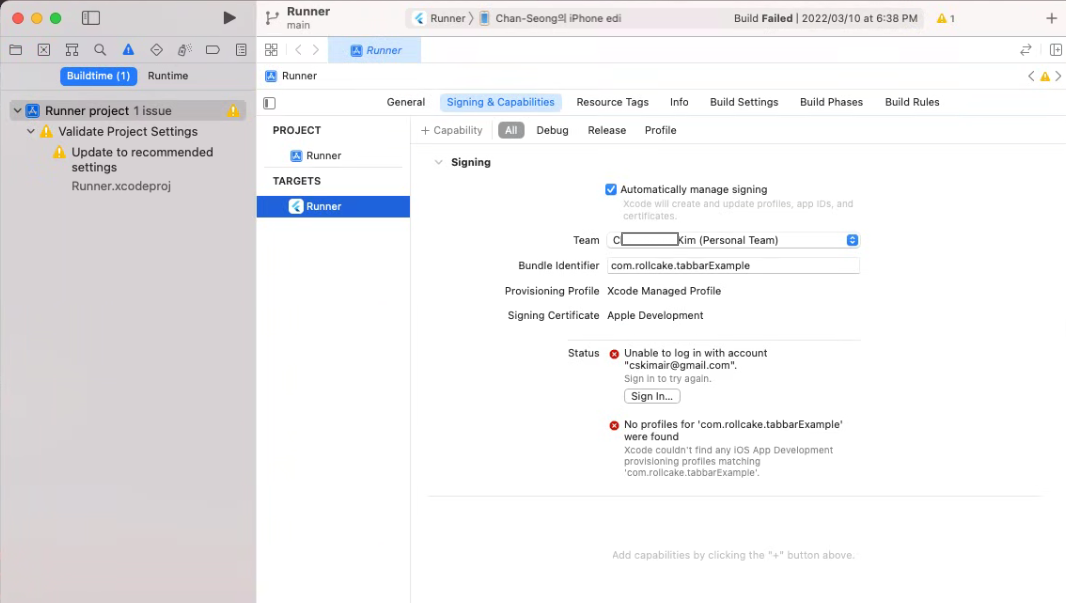
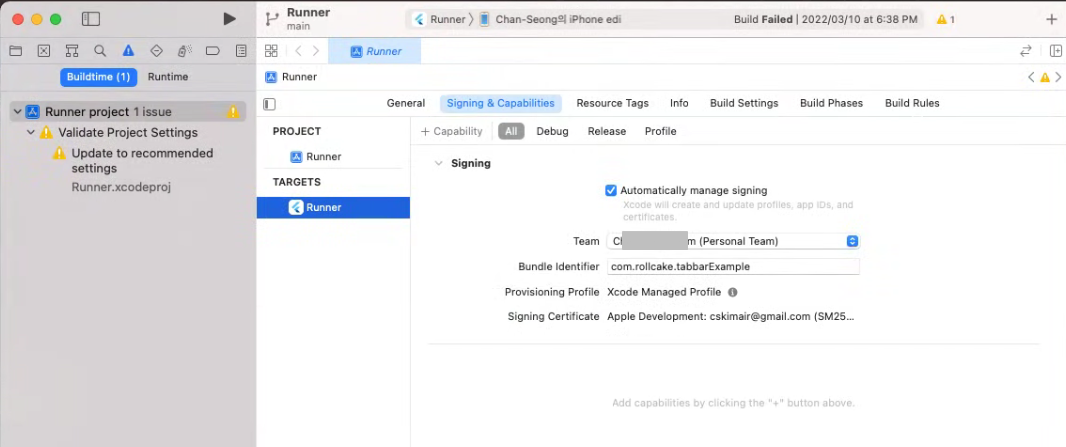
-에러코드 :
Could not build the precompiled application for the device. Error (Xcode): No profiles for 'com.rollcake.tabbarExample' were found: Xcode couldn't find any iOS App Development provisioning profiles matching 'com.rollcake.tabbarExample'. Automatic signing is disabled and unable to generate a profile. To enable automatic signing, pass -allowProvisioningUpdates to xcodebuild. It appears that there was a problem signing your application prior to installation on the device. Verify that the Bundle Identifier in your project is your signing id in Xcode open ios/Runner.xcworkspace Also try selecting 'Product > Build' to fix the problem: Error launching application on Chan-Seong의 iPhone edi. |

-
-
'os > macOS' 카테고리의 다른 글
| Rustdesk 맥OS에서 제어가 안될때 (1) | 2025.06.30 |
|---|---|
| PC can't control macOS when RustDesk (0) | 2025.03.07 |
| Flutter / AndroidStudio 에서 안드로이드 가상머신설정이 안될때 (0) | 2022.04.15 |
| Module 'path_provider_ios' not found (0) | 2022.04.07 |
| Flutter install error - cocoapods install error (0) | 2022.02.14 |
WebSerial
https://developer.chrome.com/docs/capabilities/serial?hl=ko
직렬 포트 읽기 및 쓰기 | Capabilities | Chrome for Developers
Web Serial API는 웹사이트가 직렬 장치와 통신할 수 있도록 하여 웹과 실제 세계를 연결합니다.
developer.chrome.com
'JAVA > android_studio' 카테고리의 다른 글
| Android - SerialPort (0) | 2025.11.18 |
|---|---|
| usb-serial-for-android (0) | 2025.11.18 |
| Activity에 파라미터 전달하기 (0) | 2025.11.18 |
| [Android][java] 서비스 onStartCommand()와 플래그 (0) | 2025.11.18 |
| AndroidStudio 2024.3 버젼으로 업,변경시 jdk 설정변경 (0) | 2025.09.06 |
-
https://m.blog.naver.com/yuyyulee/221691984923
[Android Tip] SerialPort(시리얼 통신) 사용하기 (JNI)
안드로이드 OS는 모바일 뿐만 아니라 다양한 기기에 적용될 수 있는데, 셋탑 박스나 디지털 광고 매체 등...
blog.naver.com
'JAVA > android_studio' 카테고리의 다른 글
| WebSerial (0) | 2025.11.18 |
|---|---|
| usb-serial-for-android (0) | 2025.11.18 |
| Activity에 파라미터 전달하기 (0) | 2025.11.18 |
| [Android][java] 서비스 onStartCommand()와 플래그 (0) | 2025.11.18 |
| AndroidStudio 2024.3 버젼으로 업,변경시 jdk 설정변경 (0) | 2025.09.06 |
-
https://github.com/mik3y/usb-serial-for-android
GitHub - mik3y/usb-serial-for-android: Android USB host serial driver library for CDC, FTDI, Arduino and other devices.
Android USB host serial driver library for CDC, FTDI, Arduino and other devices. - mik3y/usb-serial-for-android
github.com
'JAVA > android_studio' 카테고리의 다른 글
| WebSerial (0) | 2025.11.18 |
|---|---|
| Android - SerialPort (0) | 2025.11.18 |
| Activity에 파라미터 전달하기 (0) | 2025.11.18 |
| [Android][java] 서비스 onStartCommand()와 플래그 (0) | 2025.11.18 |
| AndroidStudio 2024.3 버젼으로 업,변경시 jdk 설정변경 (0) | 2025.09.06 |