
'os'에 해당되는 글 64건
- 2025.12.19 :: Flutter 인증오류
- 2025.08.03 :: windows11 설치시 MS계정없이 설치방법
- 2025.06.30 :: Rustdesk 맥OS에서 제어가 안될때 1
- 2025.03.07 :: PC can't control macOS when RustDesk
- 2024.05.22 :: Linux 서버 , Monitoring 프로그램 설치
- 2024.05.22 :: VNC setting in CentOS for windows VNC program
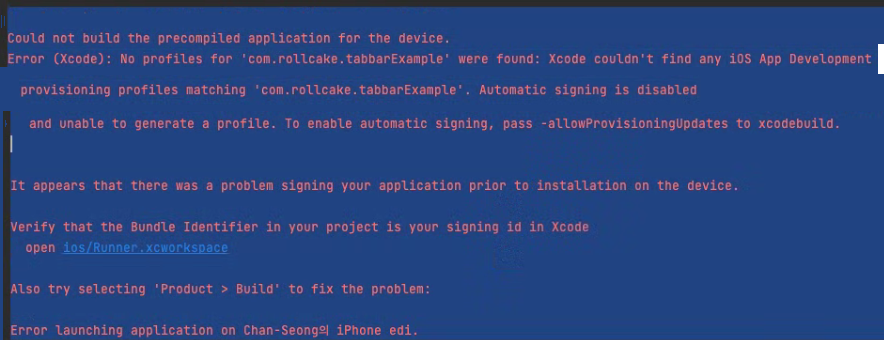
-에러코드 :
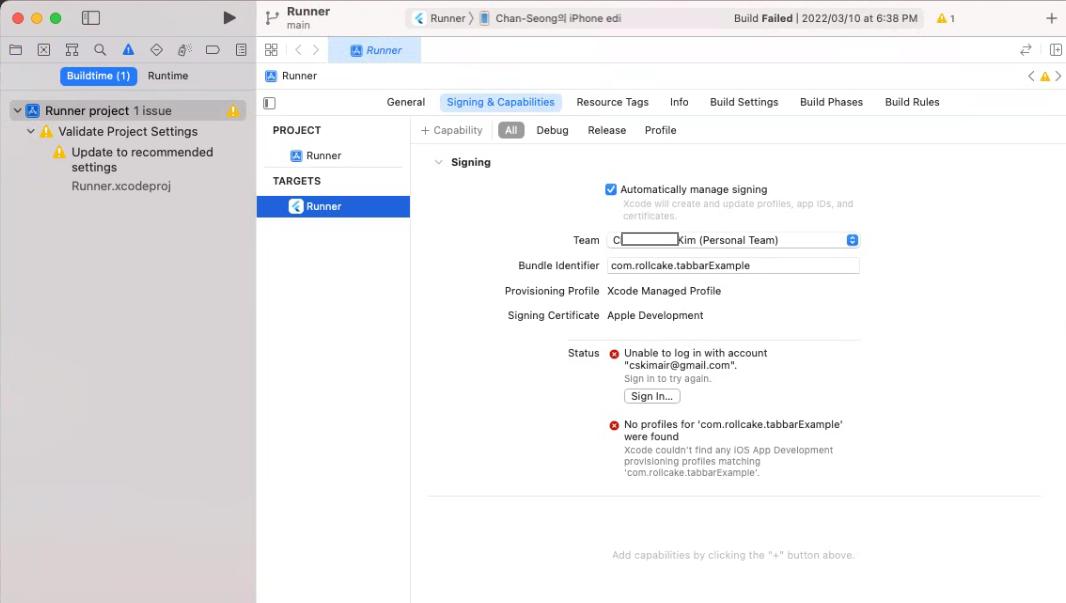
Could not build the precompiled application for the device. Error (Xcode): No profiles for 'com.rollcake.tabbarExample' were found: Xcode couldn't find any iOS App Development provisioning profiles matching 'com.rollcake.tabbarExample'. Automatic signing is disabled and unable to generate a profile. To enable automatic signing, pass -allowProvisioningUpdates to xcodebuild. It appears that there was a problem signing your application prior to installation on the device. Verify that the Bundle Identifier in your project is your signing id in Xcode open ios/Runner.xcworkspace Also try selecting 'Product > Build' to fix the problem: Error launching application on Chan-Seong의 iPhone edi. |
-
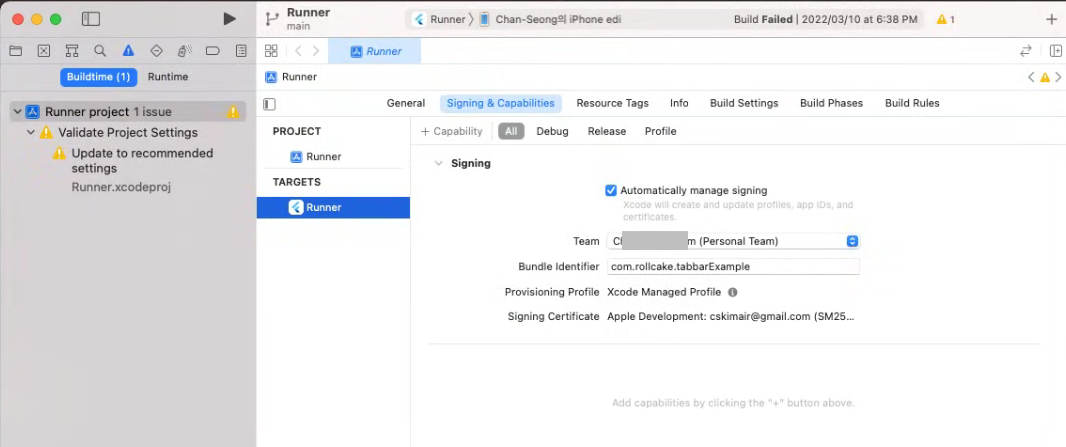
-
'os > macOS' 카테고리의 다른 글
| Rustdesk 맥OS에서 제어가 안될때 (1) | 2025.06.30 |
|---|---|
| PC can't control macOS when RustDesk (0) | 2025.03.07 |
| Flutter / AndroidStudio 에서 안드로이드 가상머신설정이 안될때 (0) | 2022.04.15 |
| Module 'path_provider_ios' not found (0) | 2022.04.07 |
| Flutter install error - cocoapods install error (0) | 2022.02.14 |
-
1. 입력 모니터링 권한 확인:
- macOS 시스템 환경설정 > 보안 및 개인 정보 보호 > 개인 정보 보호 탭으로 이동합니다.
- 왼쪽 메뉴에서 "입력 모니터링"을 선택합니다.
- RustDesk가 목록에 있고, 오른쪽에 체크 표시가 되어 있는지 확인합니다.
- 만약 RustDesk가 없다면 추가하고, 체크 표시가 없다면 체크 표시를 합니다.
- 이후 RustDesk를 재실행하여 문제가 해결되었는지 확인합니다.
-
2. Caps Lock 및 Fn 키 확인:
- 키보드의 Caps Lock 키가 켜져 있으면 대문자 입력만 가능합니다. Caps Lock을 다시 눌러 끄거나, Fn 키가 눌려 있는지 확인합니다.
- macOS에서는 키보드 뷰어를 사용하여 현재 눌린 키를 확인할 수 있습니다.
-
3. 재설치:
- RustDesk를 완전히 제거한 후 다시 설치합니다.
- RustDesk 공식 홈페이지 또는 GitHub 저장소에서 최신 버전을 다운로드하여 설치합니다.
-
4. 화상 키보드 사용:
- 입력 문제가 계속되면 시스템의 화상 키보드를 사용해 볼 수 있습니다.
- macOS 시스템 환경설정 > 손쉬운 사용 > 키보드 메뉴에서 "키보드 뷰어"를 활성화합니다.
- 화상 키보드를 사용하여 원격 컴퓨터에 입력합니다.
-
5. 온라인 문의:
- 위의 방법으로도 문제가 해결되지 않으면 RustDesk 공식 지원 페이지 또는 GitHub 저장소에서 온라인 문의를 통해 도움을 받을 수 있습니다.
- 위의 방법으로도 문제가 해결되지 않으면 RustDesk 공식 지원 페이지 또는 GitHub 저장소에서 온라인 문의를 통해 도움을 받을 수 있습니다.
- RustDesk 설정에서 "키보드 입력 가로채기" 옵션이 활성화되어 있는지 확인합니다.
- 원격 컴퓨터의 운영체제와 RustDesk 버전을 최신 버전으로 유지합니다.
- 유료 버전 사용자는 유료 지원을 받을 수 있습니다.
'os > macOS' 카테고리의 다른 글
| Flutter 인증오류 (0) | 2025.12.19 |
|---|---|
| PC can't control macOS when RustDesk (0) | 2025.03.07 |
| Flutter / AndroidStudio 에서 안드로이드 가상머신설정이 안될때 (0) | 2022.04.15 |
| Module 'path_provider_ios' not found (0) | 2022.04.07 |
| Flutter install error - cocoapods install error (0) | 2022.02.14 |
https://github.com/rustdesk/rustdesk/issues/974
Keyboard input on MacOS not working. · Issue #974 · rustdesk/rustdesk
Describe the bug you encountered: Keyboard input on MacOS does not work. (Mouse input does work.) Permissions enabled following the prompts after install. Manually added rustdesk into input monitor...
github.com
'os > macOS' 카테고리의 다른 글
| Flutter 인증오류 (0) | 2025.12.19 |
|---|---|
| Rustdesk 맥OS에서 제어가 안될때 (1) | 2025.06.30 |
| Flutter / AndroidStudio 에서 안드로이드 가상머신설정이 안될때 (0) | 2022.04.15 |
| Module 'path_provider_ios' not found (0) | 2022.04.07 |
| Flutter install error - cocoapods install error (0) | 2022.02.14 |
https://www.oss.kr/storage/app/public/oss/b2/60/[Zabbix]%20Solution%20Guide%20V0.95.pdf
ZABBIX 제대로 배워보자
'os > CentOS' 카테고리의 다른 글
| VNC setting in CentOS for windows VNC program (0) | 2024.05.22 |
|---|---|
| monitor-centos-server-performance/ (0) | 2023.12.22 |
| CentOS install with raid hard disk (0) | 2017.03.17 |
| CentOS install (0) | 2017.03.17 |
https://www.tecmint.com/install-and-configure-vnc-server-in-centos-7/
How to Install and Configure VNC Server in CentOS and RHEL
how to install and configure VNC Remote Access in CentOS 7/8 and RHEL 9/8/7 desktop edition via the tigervnc-server program to access remote desktop machines.
www.tecmint.com
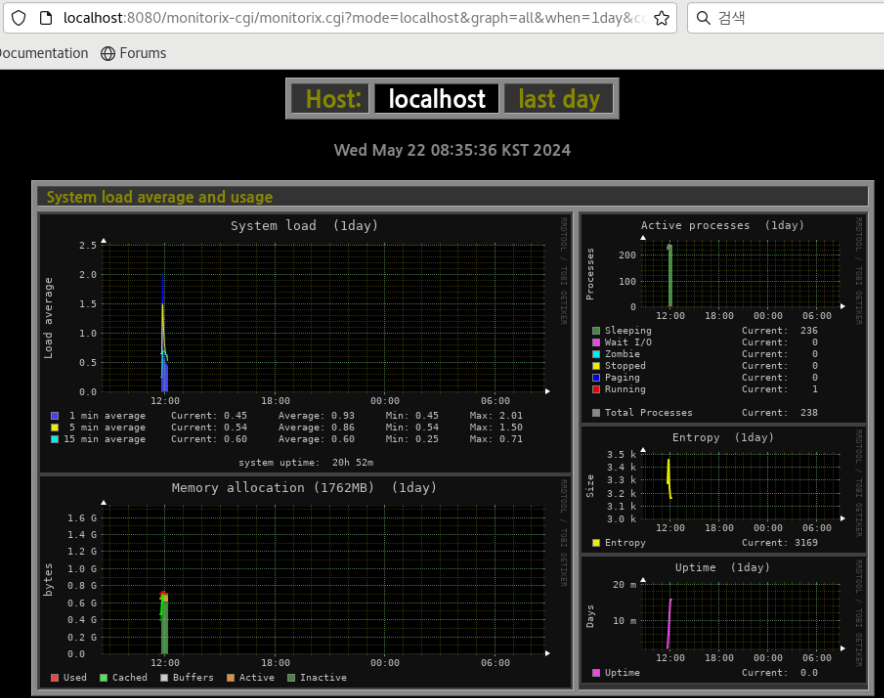
- monitorix 설치후 실행화면
'os > CentOS' 카테고리의 다른 글
| Linux 서버 , Monitoring 프로그램 설치 (0) | 2024.05.22 |
|---|---|
| monitor-centos-server-performance/ (0) | 2023.12.22 |
| CentOS install with raid hard disk (0) | 2017.03.17 |
| CentOS install (0) | 2017.03.17 |