
os/macOS
2025. 12. 19. 11:39
-에러코드 :
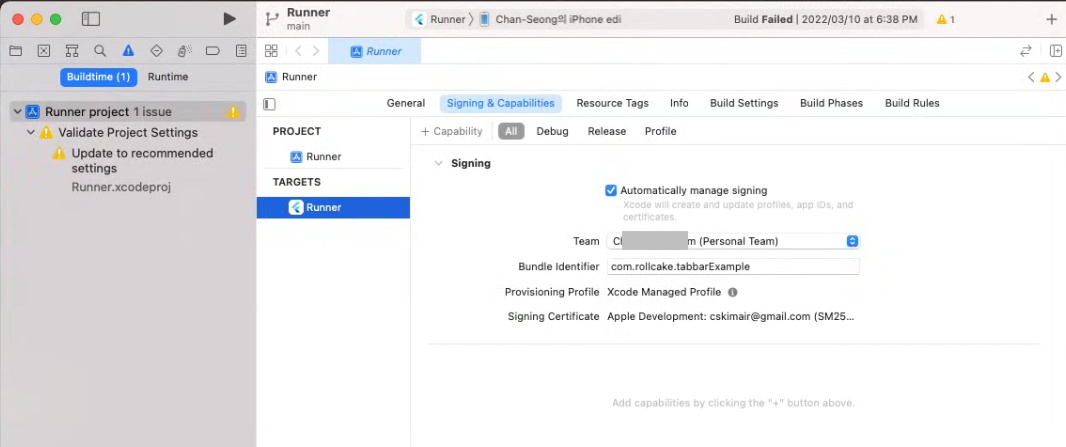
Could not build the precompiled application for the device. Error (Xcode): No profiles for 'com.rollcake.tabbarExample' were found: Xcode couldn't find any iOS App Development provisioning profiles matching 'com.rollcake.tabbarExample'. Automatic signing is disabled and unable to generate a profile. To enable automatic signing, pass -allowProvisioningUpdates to xcodebuild. It appears that there was a problem signing your application prior to installation on the device. Verify that the Bundle Identifier in your project is your signing id in Xcode open ios/Runner.xcworkspace Also try selecting 'Product > Build' to fix the problem: Error launching application on Chan-Seong의 iPhone edi. |

-

-
'os > macOS' 카테고리의 다른 글
| Rustdesk 맥OS에서 제어가 안될때 (1) | 2025.06.30 |
|---|---|
| PC can't control macOS when RustDesk (0) | 2025.03.07 |
| Flutter / AndroidStudio 에서 안드로이드 가상머신설정이 안될때 (0) | 2022.04.15 |
| Module 'path_provider_ios' not found (0) | 2022.04.07 |
| Flutter install error - cocoapods install error (0) | 2022.02.14 |