
'board_android-IoT'에 해당되는 글 87건
- 2023.01.11 :: STM32F107 외부 인터럽트
- 2022.10.12 :: STM32F Timer2 (TIM2) Init and run
- 2021.09.20 :: UART interrupt and polling comparison
- 2021.08.27 :: A31G112CL / A31G11x , Software Serial (TX only, for debugging , STM32)
- 2021.08.25 :: PL2303HX (USB-to-Serial) chip device driver install error (PL2303HXA PHASED OUT) 1
- 2021.08.24 :: ST-LINK/V2 , cannot connect to target
- SPT.Finder 의 PC12번 외부인터럽트 설정관련 참고자료
> EXTI15_10_IRQHandler() 함수를 호출해서 인터럽트가 발생하면 처리하게 되어 있음.
stm32-외부 인터럽트
※이 문서에는 오류가 있을 수 있습니다. STM32F4은 23개의 외부 인터럽트 이벤트 소스(edge-detector 회로)를 가지고있다. 모든 GPIO 핀을 외부인터럽트로 사용할 수 있다. (외부인터럽트핀이 지정되어
pcb4.tistory.com
'board_android-IoT > STM32F' 카테고리의 다른 글
| STM32F103CBT6(128KB Flash) user flash write (1) | 2023.10.26 |
|---|---|
| Target is not responding, retrying (0) | 2023.10.21 |
| Keypad double click detect (0) | 2023.10.11 |
| convert usb serial port to bluetooth communication (0) | 2023.04.01 |
| STM32F Timer2 (TIM2) Init and run (0) | 2022.10.12 |
- TIM2
> 사용하는 보드는 STM32F103계열로 72Mhz사용함.
>>.3. stm32f1xx_it.c
| /** * @brief This function handles TIM2 global interrupt. */ void TIM2_IRQHandler(void) { /* USER CODE BEGIN TIM2_IRQn 0 */ /* USER CODE END TIM2_IRQn 0 */ HAL_TIM_IRQHandler(&htim2); /* USER CODE BEGIN TIM2_IRQn 1 */ //============================================ // 100uSec timer static int n_Timer1Interrupt = 0; GPS.usec++; GetHandyPhase(); Make60Hz(); if(++n_Timer1Interrupt > (T1COUNTER4SEC-1)) { n_Timer1Interrupt = 0; INS.timemarkon = ON; // BUZZ status toggle for debugging GPIOE->ODR ^= GPIO_PIN_0 ; //debug , 20220902 , 20221012 , BUZZ , PE0 , } // HAL_GPIO_TogglePin(TP7_GPIO_Port, TP7_Pin); /* USER CODE END TIM2_IRQn 1 */ } |
>>.2. main.c/main()에서 아래 함수 호출하여 htim2 활성화(시작)한다
HAL_TIM_Base_Start_IT(&htim2);
>>.1. TIM2 초기화 (main.c)
| /* TIM2 init function */ static void MX_TIM2_Init(void) { TIM_ClockConfigTypeDef sClockSourceConfig; TIM_MasterConfigTypeDef sMasterConfig; htim2.Instance = TIM2; htim2.Init.Prescaler = 72; htim2.Init.CounterMode = TIM_COUNTERMODE_UP; htim2.Init.Period = 99; htim2.Init.ClockDivision = TIM_CLOCKDIVISION_DIV1; htim2.Init.AutoReloadPreload = TIM_AUTORELOAD_PRELOAD_DISABLE; if (HAL_TIM_Base_Init(&htim2) != HAL_OK) { _Error_Handler(__FILE__, __LINE__); } sClockSourceConfig.ClockSource = TIM_CLOCKSOURCE_INTERNAL; if (HAL_TIM_ConfigClockSource(&htim2, &sClockSourceConfig) != HAL_OK) { _Error_Handler(__FILE__, __LINE__); } sMasterConfig.MasterOutputTrigger = TIM_TRGO_RESET; sMasterConfig.MasterSlaveMode = TIM_MASTERSLAVEMODE_DISABLE; if (HAL_TIMEx_MasterConfigSynchronization(&htim2, &sMasterConfig) != HAL_OK) { _Error_Handler(__FILE__, __LINE__); } } |
https://blog.naver.com/eziya76/221451890046
[STM32 HAL] Timer# Basic 타이머
Reference: Mastering STM32 by Carmine Noviello ** 자료 해석에 오류가 있을 수 있습니다 ** [배...
blog.naver.com
'board_android-IoT > STM32F' 카테고리의 다른 글
| STM32F103CBT6(128KB Flash) user flash write (1) | 2023.10.26 |
|---|---|
| Target is not responding, retrying (0) | 2023.10.21 |
| Keypad double click detect (0) | 2023.10.11 |
| convert usb serial port to bluetooth communication (0) | 2023.04.01 |
| STM32F107 외부 인터럽트 (0) | 2023.01.11 |
- EINT(External Interrupt)
*. How to solve link error message:
uvison5 Error: L6218E: Undefined symbol HAL_INT_EInt_MaskDisable (referred from main.o).
#ABOVE #A31G112 #A31G
> Select runtime environment

> Make INTC(Manage Run-Time Environment>Device>INTC ) as selected

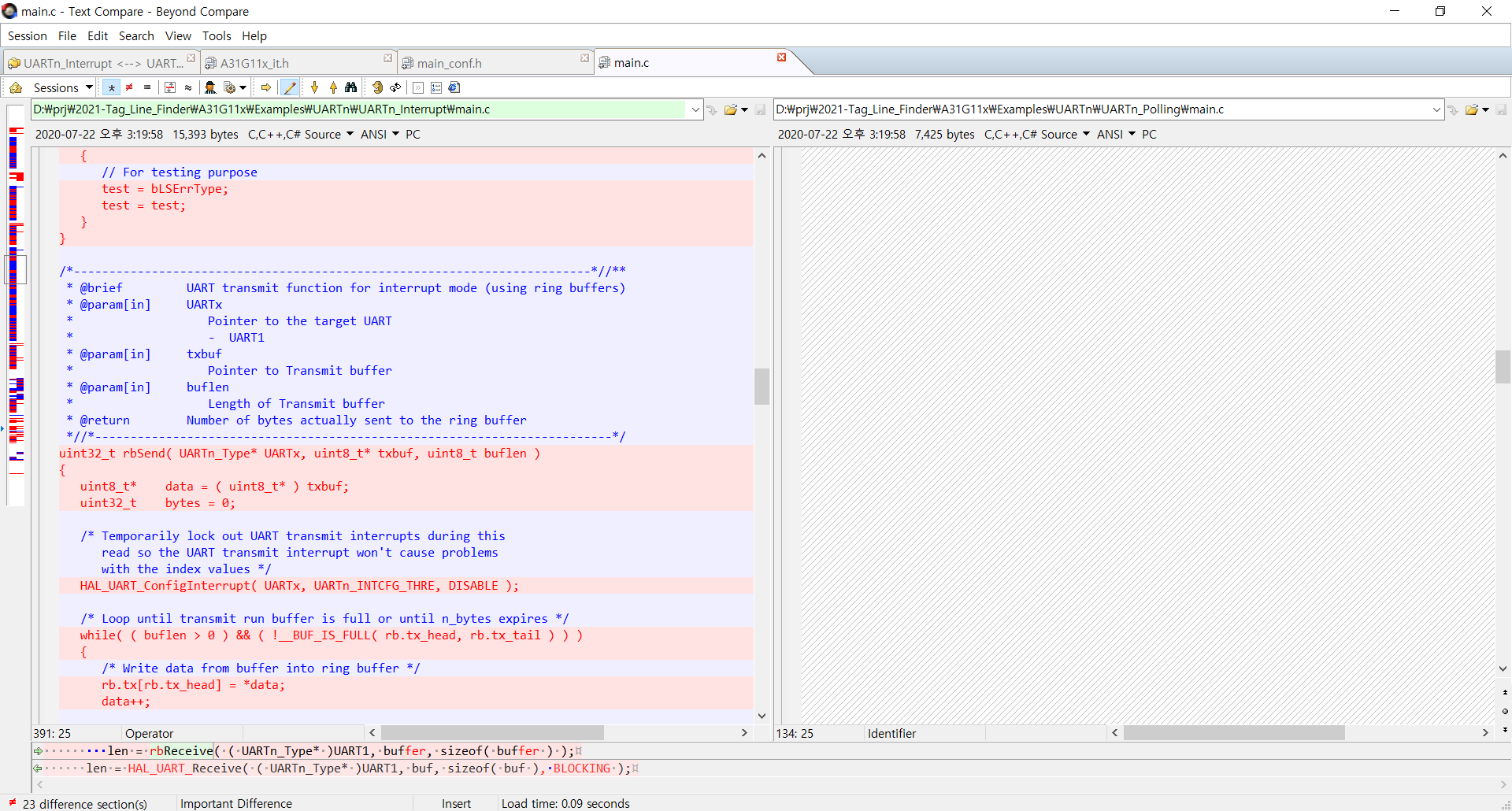
- UART interrupt handler

- function declaration
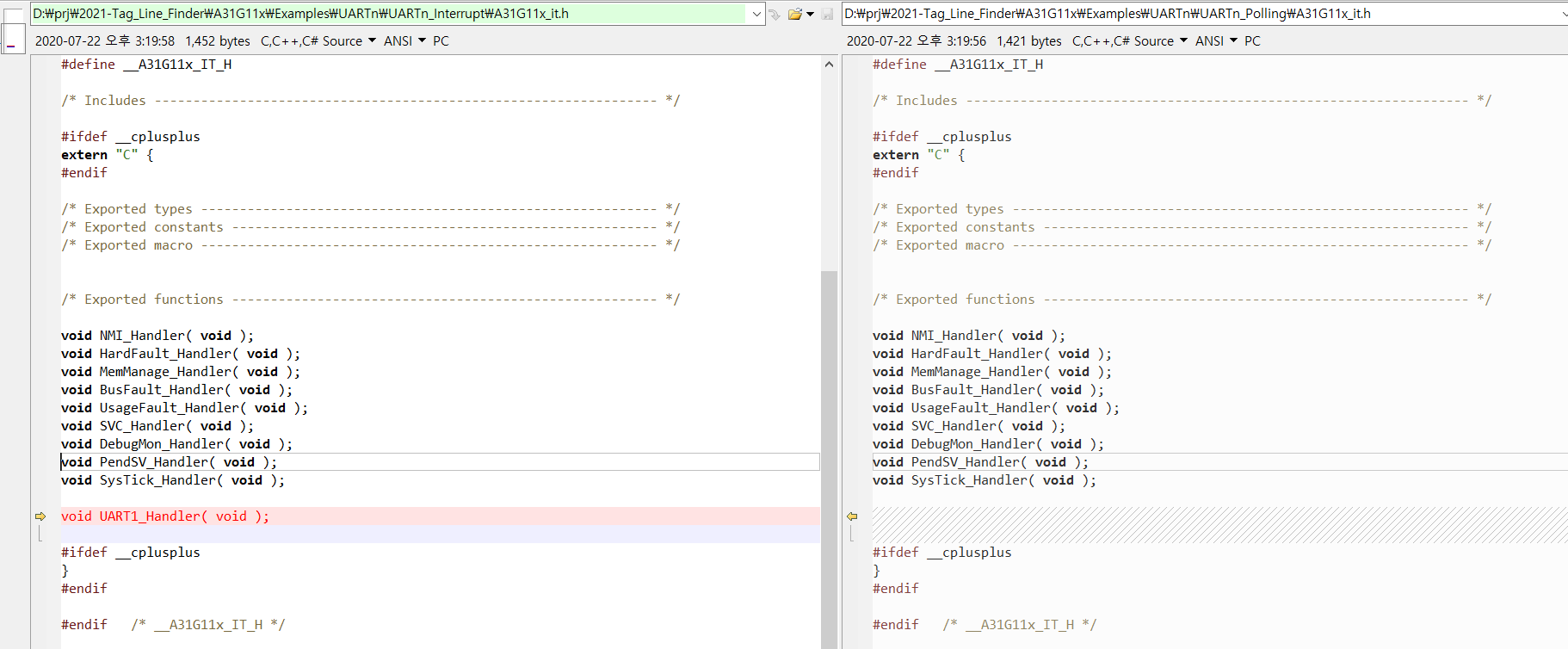
- UART1_IRQHandler_IT

- main.c
> function and structure declarations
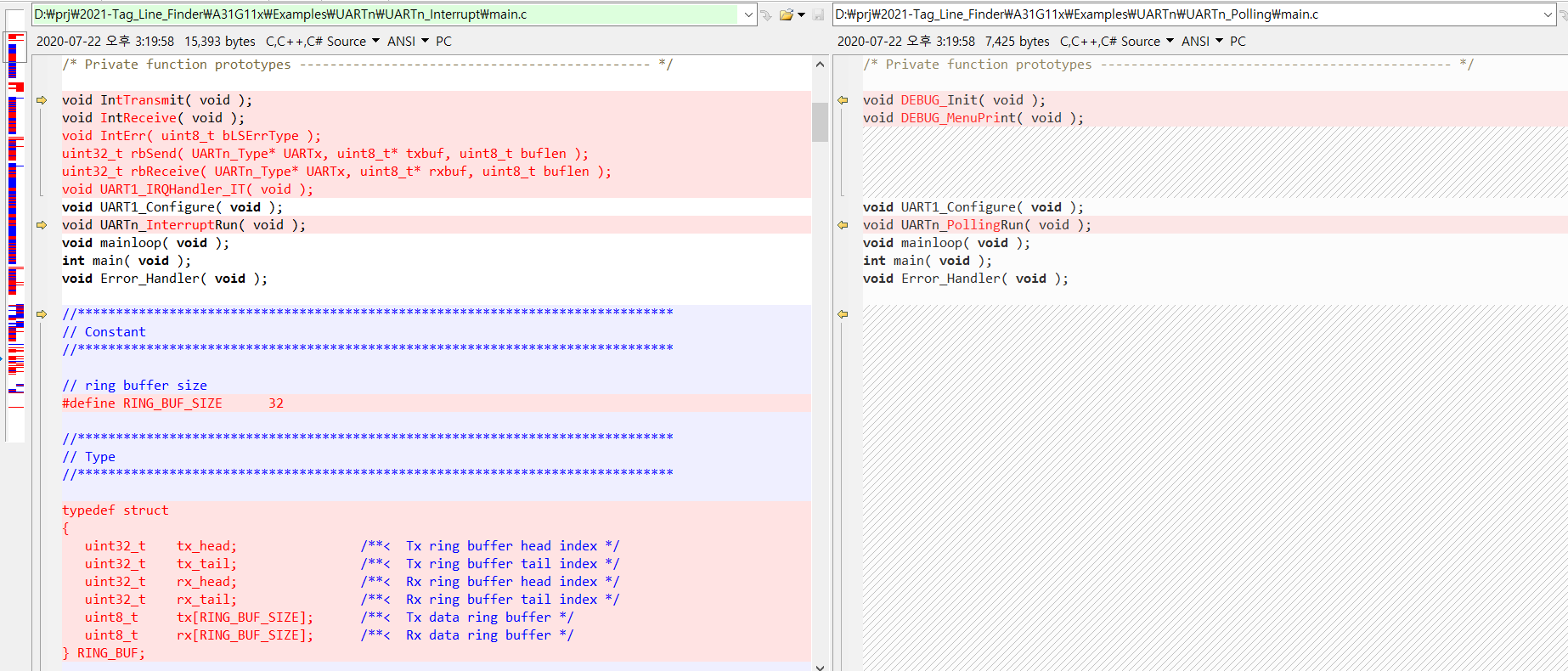
-

-

-
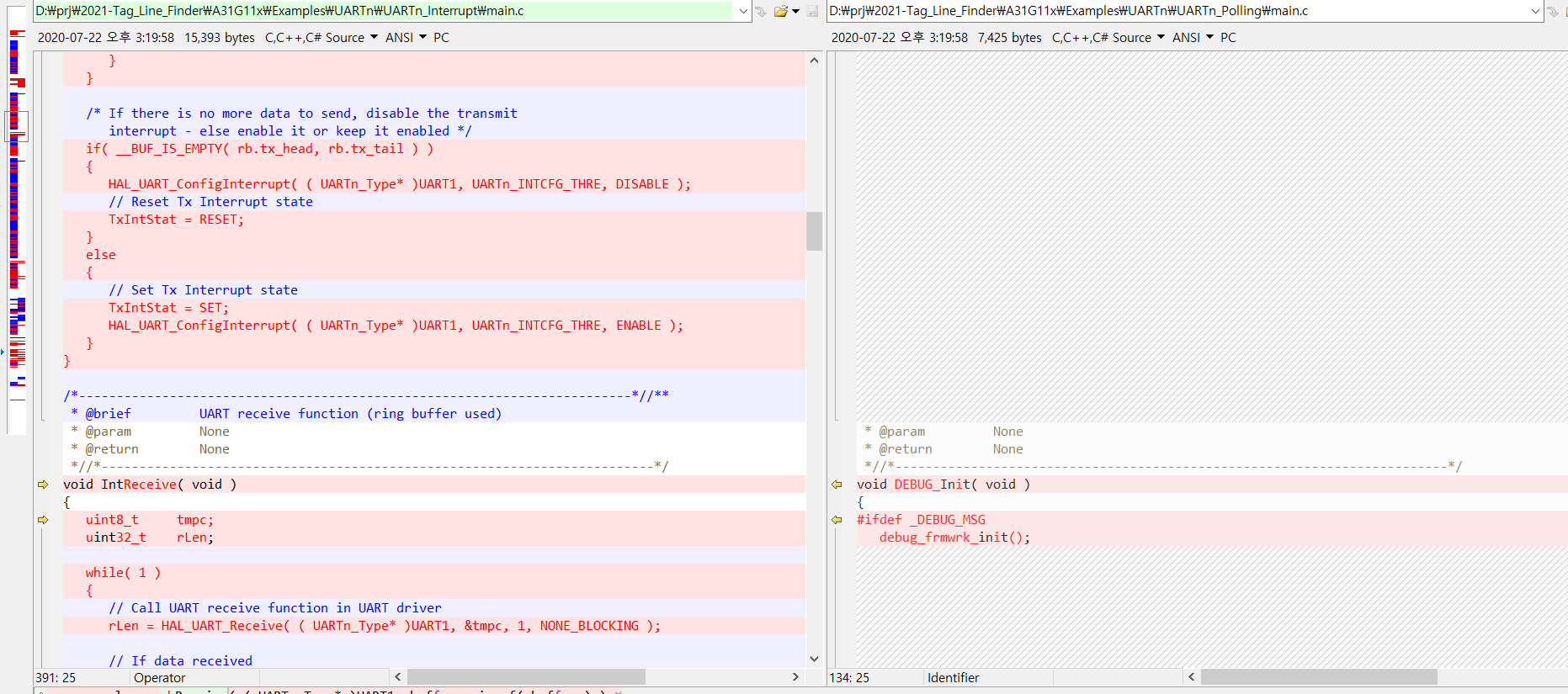
-
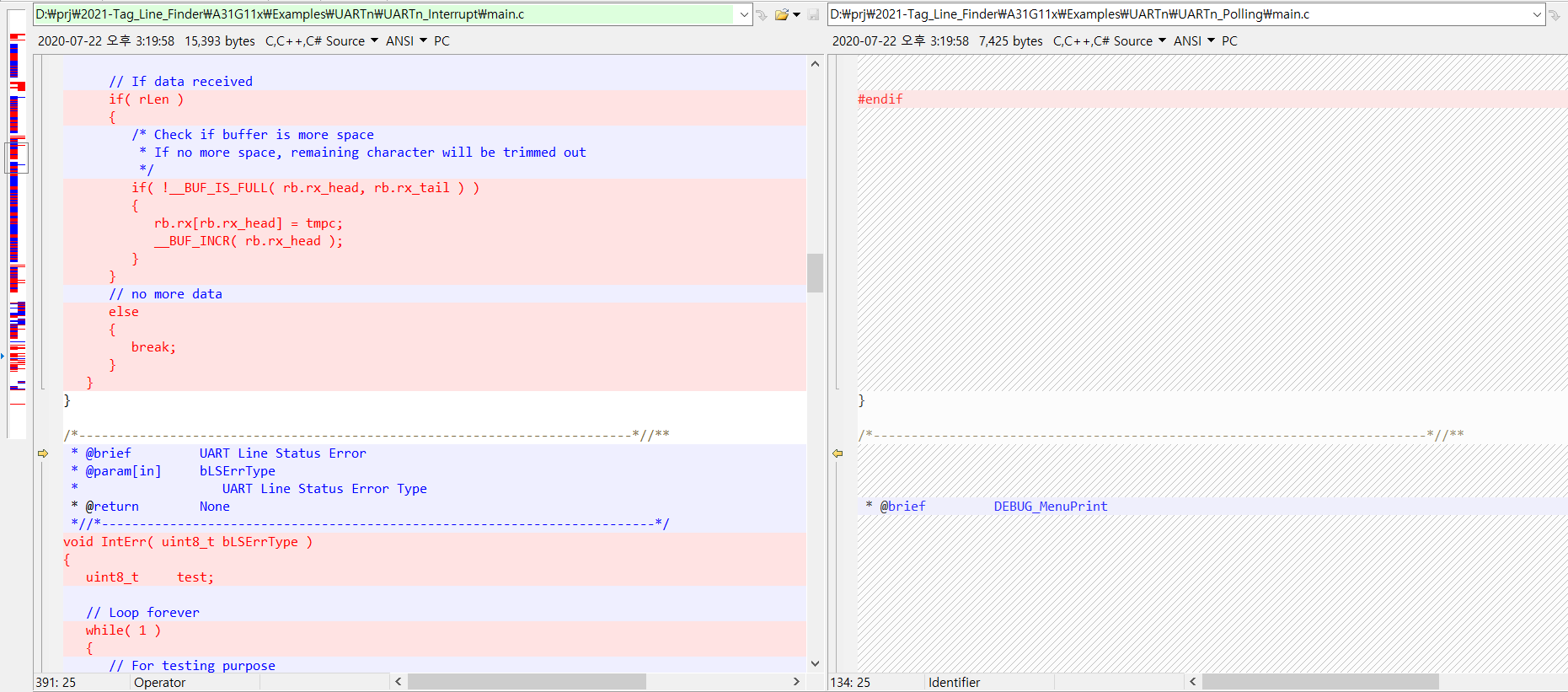
-
-

-

-

'board_android-IoT > ABOVE.A31G112CL' 카테고리의 다른 글
| A31G112CL / A31G11x , Software Serial (TX only, for debugging , STM32) (0) | 2021.08.27 |
|---|---|
| ABOVE A31G112CL starter kit (0) | 2021.08.24 |
장점 pron: 사용안하는 pin을 UART출력으로 사용해서 디버깅에 활용
단점 con: 딜레이를 사용하므로 디버깅단계 이후에는 별도의 루틴을 만들거나 타이머를 따로 할당해야 함.
| /* 참고: https://m.blog.naver.com/PostView.naver?isHttpsRedirect=true&blogId=chandong83&logNo=221399704423 STM32 소프트웨어 UART Tx 만들어보기 FILE: software_uart.c */ /***************************************************************************//** * @file software-serial.c * @brief Contains all macro definitions and function prototypes * support for Example Code on A31G11x * * * @version 0.01 * @date 2020-08-26 * @author SkyBlue Application Team * * Copyright(C) 2021, SkyBlue. * All rights reserved. * *//****************************************************************************/ #include "software_uart.h" //보레이트 비트 지연 시간 #define BAUD_RATE_2400_DELAY (1000000U/2400) #define BAUD_RATE_9600_DELAY (1000000U/9600) #define BAUD_RATE_115200_DELAY (1000000U/115200) //TX 포트 #define ABOVE_CPU_A31G112CL 1 #ifdef ABOVE_CPU_A31G112CL #warning "ABOVE_CPU is defined" #define UART_PORT PA // GPIOB #define UART_PIN 5 // GPIO_PIN of UART_PORT #else #warning "STM32 cpu is defined" #define UART_PORT GPIOB #define UART_PIN GPIO_PIN_15 #endif //1us delay 함수 void DelayUs(uint32_t udelay) { __IO uint32_t Delay = udelay * (SystemCoreClock / 10U / 1000000U); //위의 변수에서 10U는 조절해보면서 맞춰야함. do { __NOP(); } while (Delay --); } //uart 비트 딜레이 함수 void uartDelay() { DelayUs(BAUD_RATE_2400_DELAY ) ; // BAUD_RATE_115200_DELAY); } /* //HAL_GPIO_SetPin( ( Pn_Type* )PA, _BIT( 5 ) ); // software serial port // output low HAL_GPIO_ClearPin( ( Pn_Type* )PE, _BIT( 0 ) ); */ void sendUartBit(uint8_t b) { #if 1 // ABOVE_CPU_A31G112CL //비트가 참이면 핀을 high if(b) { HAL_GPIO_SetPin( ( Pn_Type* )UART_PORT, _BIT( UART_PIN ) ); // software serial port } //비트가 거짓이면 핀을 low else { HAL_GPIO_ClearPin( ( Pn_Type* )UART_PORT, _BIT( UART_PIN ) ); } #endif /* // STM32F CPU //비트가 참이면 핀을 high if(b) { UART_PORT->BSRR = UART_PIN; } //비트가 거짓이면 핀을 low else { UART_PORT->BSRR = (uint32_t)UART_PIN << 16U; } */ } //uart TX함수 void uartTx(uint8_t c) { int i=0; //start bit sendUartBit(0); uartDelay(); //data lsb for(;i<8;i++) { sendUartBit(c&0x01); uartDelay(); c>>=1; } //stop bit sendUartBit(1); uartDelay(); } //int fputc(int c, FILE *stream) //{ // uartTx( (uint8_t) c ) ; // return 1 ; // //return(ITM_SendChar(c)); //} /*-------------------------------------------------------------------------*//** * @brief Puts a string to UART port * @param[in] UARTx * Pointer to the target UART * - UART0 ~ UART1 * @param[in] str * String to put * @return None *//*-------------------------------------------------------------------------*/ void Dbg_UARTPuts( /*UARTn_Type* UARTx,*/ const void* str ) { uint8_t* s = ( uint8_t* )str; while( *s ) { uartTx( *s++ ); //UARTPutChar( UARTx, *s++ ); } } /*-------------------------------------------------------------------------*//** * @brief Puts a string to UART port and print new line * @param[in] UARTx * Pointer to the target UART * - UART0 ~ UART1 * @param[in] str * String to put * @return None *//*-------------------------------------------------------------------------*/ void Dbg_UARTPuts_( /*UARTn_Type* UARTx, */const void* str ) { Dbg_UARTPuts( /*UARTx, */ str ); Dbg_UARTPuts( /*UARTx, */"\n\r" ); } void DbgMsg_( /*UARTn_Type* UARTx, */const void* str ) { Dbg_UARTPuts_( str) ; } |
| /***************************************************************************//** * @file software-serial.h * @brief Contains all macro definitions and function prototypes * support for Example Code on A31G11x * * * @version 0.01 * @date 2020-08-26 * @author SkyBlue Application Team * * Copyright(C) 2021, SkyBlue * All rights reserved. * *//****************************************************************************/ #ifndef __software_uart_H #define __software_uart_H /* Includes ----------------------------------------------------------------- */ /* #include "stdint.h" */ #include "A31G11x.h" #include "A31G11x_hal_pcu.h" #ifdef __cplusplus extern "C" { #endif /* Private typedef ---------------------------------------------------------- */ /* Private define ----------------------------------------------------------- */ /* Private macro ------------------------------------------------------------ */ /* Private variables -------------------------------------------------------- */ /* Private define ----------------------------------------------------------- */ /* Private function prototypes ---------------------------------------------- */ void uartTx(uint8_t c) ; #ifdef __cplusplus } #endif #endif /* __software_uart_H */ |
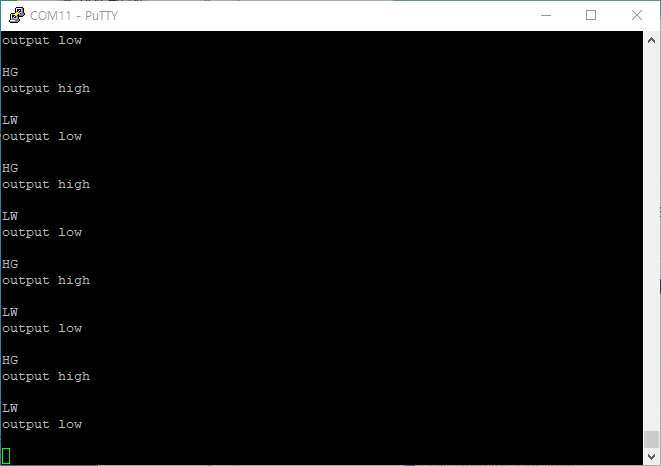
- output, result screen:
- STM32 Software serial, SOFTWARE UART
- arduino software serial
https://www.arduino.cc/en/Tutorial/LibraryExamples/SoftwareSerialExample
Software Serial Example
Open-source electronic prototyping platform enabling users to create interactive electronic objects.
www.arduino.cc
#ABOVE_CPU #STM32
#A31G11x
#CoretexM0 #Coretex_M0
#A31G112CL _software_serial
#STM32_Software_UART
#software_UART
'board_android-IoT > ABOVE.A31G112CL' 카테고리의 다른 글
| UART interrupt and polling comparison (0) | 2021.09.20 |
|---|---|
| ABOVE A31G112CL starter kit (0) | 2021.08.24 |
1. usb to serial cable module driver install error
- message : PL2303HXA PHASED OUT SINCE 2021...
(이미 예전 파일이라 드라이버 지원 안한다... -.-)

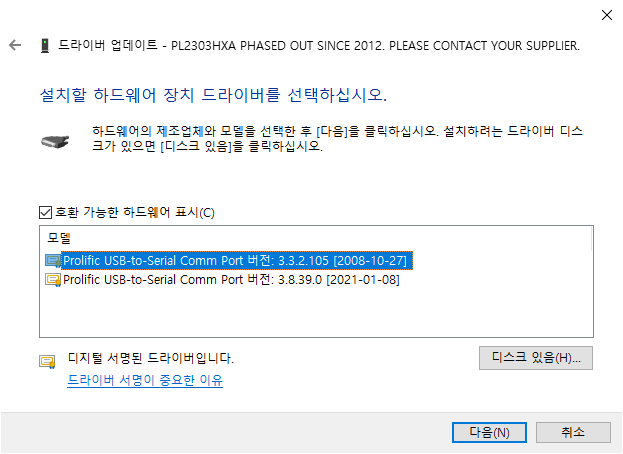
2. 조치방법
- PH2303HXA 드라이버를 설치하고 다음 단계를 진행해야함(예전 버젼을 설치, 첨부파일 참고)
- 드라이버 업데이트

- 내 컴퓨터에서 드라이버 찾아보기

- 드라이버 업데이트 > 컴퓨터에서 사용가능한 드라이버 목록에서 직접선택
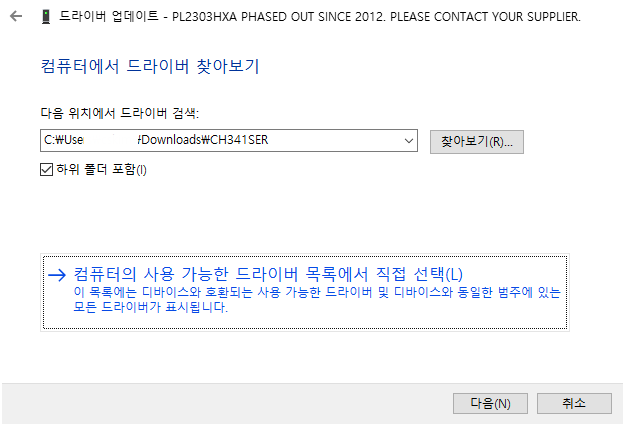
- 2008-10-27 버젼을 선택함
- 업데이트 완료화면 나옴
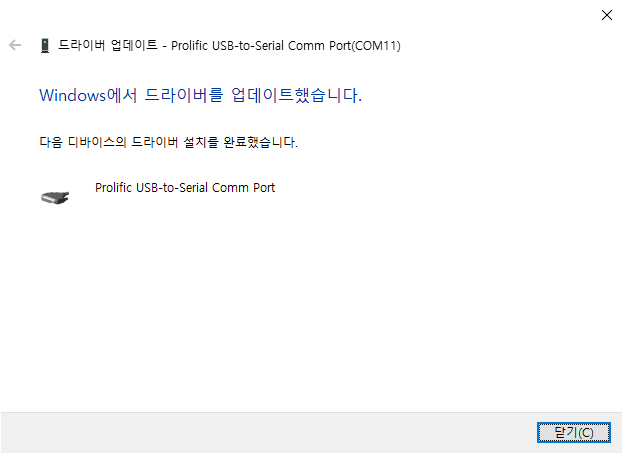
-설치결과

'board_android-IoT > STM32_ST-LINK' 카테고리의 다른 글
| ST-LINK/V2 , cannot connect to target (0) | 2021.08.24 |
|---|---|
| STM32CubeIDE 간단사용기 (0) | 2020.05.21 |
1. not ST-LINK/V2 stick problem but problem of firmware downloaded to STM32 board
(ST-LINK/V2 장치의 문제가 아니라 STM32의 펌웨어 빌드시 ST-LINK관련 PIN의 기능할당이 안되서 발생하는 문제일수 있음)
- due to downloaded firmware which some features are disabled
(at first I can download my led blink example after downloading STM32F boards can not connected with ST-LINK stick
- SWD related pin are should be enabled
- STM32CubeMX create project default does not enable SWD related pins
- Pinout & Configuration > Pinout > Disable All Modes makes SWD pins enable
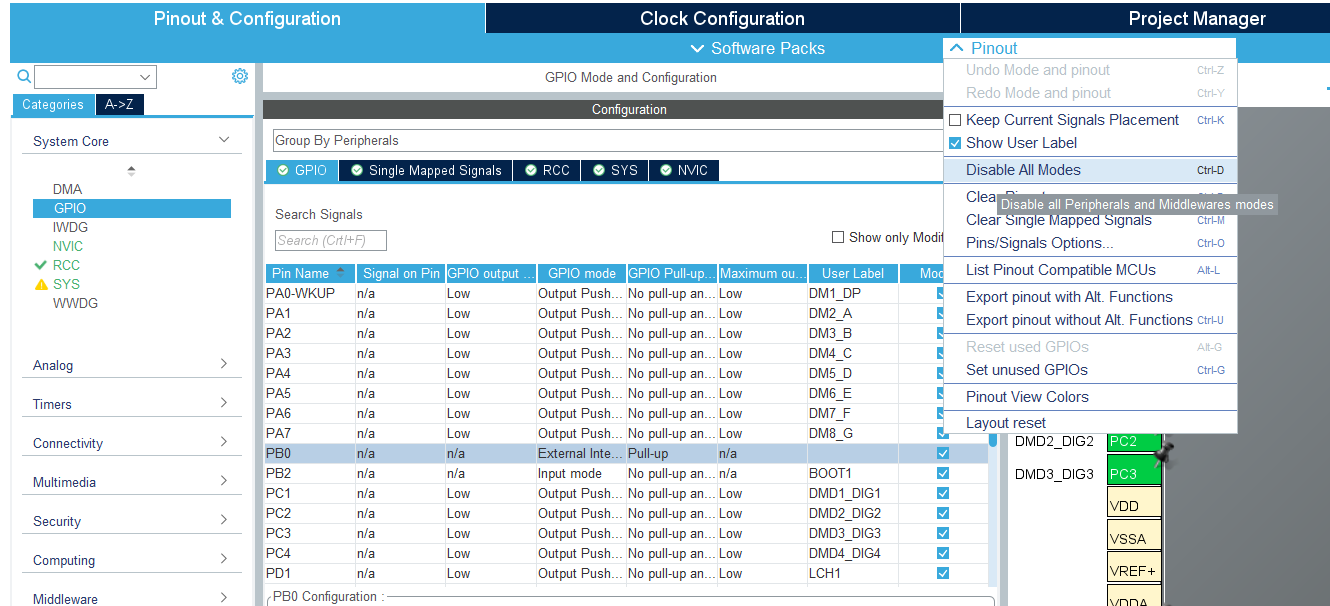
- I used STM32 flash program which uses UART ( en.flasher-stm32_v2.8.0.zip )
> boot pin chnage necessary
'board_android-IoT > STM32_ST-LINK' 카테고리의 다른 글
| PL2303HX (USB-to-Serial) chip device driver install error (PL2303HXA PHASED OUT) (1) | 2021.08.25 |
|---|---|
| STM32CubeIDE 간단사용기 (0) | 2020.05.21 |