
'board_android-IoT'에 해당되는 글 87건
- 2023.10.21 :: Target is not responding, retrying
- 2023.10.11 :: Keypad double click detect
- 2023.09.18 :: ESP32 + GPS + RF433MHz RECV PCB
- 2023.06.15 :: Arduino - ADC voltage measurement using Aref
- 2023.04.30 :: ESP32-S3-USB-OTG
- 2023.04.01 :: convert usb serial port to bluetooth communication
https://community.st.com/t5/stm32cubeide-mcus/target-is-not-responding-retrying-issues/td-p/143533
Target is not responding, retrying.. Issues ?
Hai....., I am using STM32H743IIT6 custom Board and CubeIDE. Run the code after download it showing "Target not responding retrying......." and again try to download the same code in MCU i couldn't download, It show "Error in initializing ST-LINK device. R
community.st.com
I had faced with similar issue on Nucleo F103RB for debugging alternative.
I have solved with clock setting of CPU as 8MHz from 72MHz.
After this change problem has gone away.
Thus problem CPU drain increase as not matched with USB operation from PC.
So alternative way is increase power drain asserting from VIN terminal with external power supply.
Please try it.
How can I recover my STM32H7 board after facing a power configuration deadlock?
After programming my STM32H7 and performing a reset, I find that I can no longer connect to my target using STLINK. Why does this happen? How can I recover my board?Note that your STM32H7’s SMPS or LDO firmware power configuration must match with the boa
community.st.com
https://community.st.com/t5/stm32-mcus/why-my-stm32-doesn-t-start/ta-p/49367
Why my STM32 doesn't start?
How to make sure the STM32 starts properly in our design? Let's look at the following aspects in more detail: 1. HW considerations 2. Start-up configuration 3. Software 4. Summary (TL;DR) 1. HW considerations Datasheet and other documentation Please always
community.st.com
'board_android-IoT > STM32F' 카테고리의 다른 글
| STM32F , SWV기능 사용하기 , printf in IDE (0) | 2023.11.09 |
|---|---|
| STM32F103CBT6(128KB Flash) user flash write (1) | 2023.10.26 |
| Keypad double click detect (0) | 2023.10.11 |
| convert usb serial port to bluetooth communication (0) | 2023.04.01 |
| STM32F107 외부 인터럽트 (0) | 2023.01.11 |
'board_android-IoT > STM32F' 카테고리의 다른 글
| STM32F103CBT6(128KB Flash) user flash write (1) | 2023.10.26 |
|---|---|
| Target is not responding, retrying (0) | 2023.10.21 |
| convert usb serial port to bluetooth communication (0) | 2023.04.01 |
| STM32F107 외부 인터럽트 (0) | 2023.01.11 |
| STM32F Timer2 (TIM2) Init and run (0) | 2022.10.12 |
-구성도:
>GPS:NEO8M(/w PPS) + ESP32 + RF_RECV(433MHz)

- 참고 PCB:
https://www.instagram.com/p/CxFAeNBv5B5/?img_index=1

'board_android-IoT > ESP32-S3-USB-OTG' 카테고리의 다른 글
| ESP32 build tools for visualstudio code (0) | 2024.01.27 |
|---|---|
| ESP32-S3-USB-OTG (0) | 2023.04.30 |
- 아두이노 우노의 3.3V 핀을 A0에 연결해서 전압측정함.
>측정시 5V의 실제 전압은 4.65V가 나와서 (PC USB PORT <-> UNO) 이 값으로 Aref 핀에 연결하고 측정함.
(이렇게 해야 정확한 값이 측정됨)
| 16:18:42.132 -> digital value = 742, Aref:4.64, ADC voltage = 3.36 16:18:43.188 -> digital value = 743, Aref:4.64, ADC voltage = 3.36 16:18:44.242 -> digital value = 740, Aref:4.65, ADC voltage = 3.36 16:18:45.312 -> digital value = 742, Aref:4.64, ADC voltage = 3.36 16:18:46.352 -> digital value = 743, Aref:4.64, ADC voltage = 3.36 16:18:47.423 -> digital value = 742, Aref:4.62, ADC voltage = 3.35 16:18:48.480 -> digital value = 742, Aref:4.64, ADC voltage = 3.36 |
- Aref 전압을 입력받아서 정확한 값 측정,
|
int sensorPin = A0; // input pin for the potentiometer
int digitalValue = 0;// variable to store the value coming from the sensor
void setup() {
Serial.begin(9600);
// 아날로그 입력 핀을 읽기 전에 아날로그 기준 값을 외부 전원을
// 사용하는 것으로 설정합니다:
}
void loop() {
// analogReference(EXTERNAL);
delay(10);
digitalValue = analogRead(sensorPin);// read the value from the analog channel
Serial.print("digital value = ");
Serial.print(digitalValue); //print digital value on serial monitor
float voltage = readAref();
Serial.print(", Aref:");
Serial.print(voltage);
float ADC_voltage = voltage * (float)digitalValue / (float)1024;
Serial.print(", ADC voltage = ");
Serial.println( ADC_voltage ); //print digital value on serial monitor
delay(1000);
}
//
// Function readAref
//
// Reads AREF (when external voltage is supplied).
// When the AREF pin is open, a value of 1.1V is returned.
// This function is only valid for a voltage at AREF of 1.1 to 5V.
//
// The calculations can be translated for integers to prevent
// use of float.
// Only for the Arduino Uno, Nano, Pro Micro at this moment.
// Experimental, no guarantees.
// public domain
//
float readAref (void) {
float volt;
#if defined (__AVR_ATmega8__)
#elif defined (__AVR_ATmega168__)
#elif defined (__AVR_ATmega168A__)
#elif defined (__AVR_ATmega168P__)
#elif defined (__AVR_ATmega328__)
#elif defined (__AVR_ATmega328P__)
// set reference to AREF, and mux to read the internal 1.1V
// REFS1 = 0, REFS0 = 0, MUX3..0 = 1110
ADMUX = _BV(MUX3) | _BV(MUX2) | _BV(MUX1);
// Enable the ADC
ADCSRA |= _BV(ADEN);
// Wait for voltage to become stable after changing the mux.
delay(20);
// Start ADC
ADCSRA |= _BV(ADSC);
// wait for the ADC to finish
while (bit_is_set(ADCSRA,ADSC));
// Read the ADC result
// The 16-bit ADC register is 'ADC' or 'ADCW'
unsigned int raw = ADCW;
// Calculate the Aref.
volt = 1.1 / (float) raw * 1024.0;
#elif defined (__AVR_ATmega32U4__)
#elif defined (__AVR_ATmega1280__) || defined (__AVR_ATmega2560__)
#endif
// Try to return to normal.
analogReference(EXTERNAL);
analogRead(A0); // the mux is set, throw away ADC value
delay(20); // wait for voltages to become stable
return volt;
}
|
'board_android-IoT > arduino_esp8266_esp32' 카테고리의 다른 글
| Conditional compile for ESP32 and ESP32S3 (0) | 2024.11.16 |
|---|---|
| Arduino External Interrup + Button (0) | 2021.08.22 |
| STM32 CPU and 7Segment interface (0) | 2021.08.13 |
| ESP8266-weather(temperature_humidity) station (0) | 2021.05.14 |
| MINIDK, ESP8266-weather(temperature_humidity) station (0) | 2021.05.05 |
1. 개발환경 , Development environment
2. ESP32-S3-USB-OTG
2.1 git hub
'board_android-IoT > ESP32-S3-USB-OTG' 카테고리의 다른 글
| ESP32 build tools for visualstudio code (0) | 2024.01.27 |
|---|---|
| ESP32 + GPS + RF433MHz RECV PCB (0) | 2023.09.18 |
Let's make legacy equipment connected!
(From USB Serial cable connection to bluetooth connection! )
1. This page is made for converting usb serial port to bluetooth port. So as to communicate mcu's usb serial port with smartphon.
- I have a STM32F107 + PL2303(mini usb port) embedded device.
- This is a legacy device only communicate through this mini usb cable with PC.
- So, I'd like to make communication with this legacy device through bluetooth.
- overview of converting USB serial port into bluetooth
>interfacing USB SerialPort with Bluetooth module
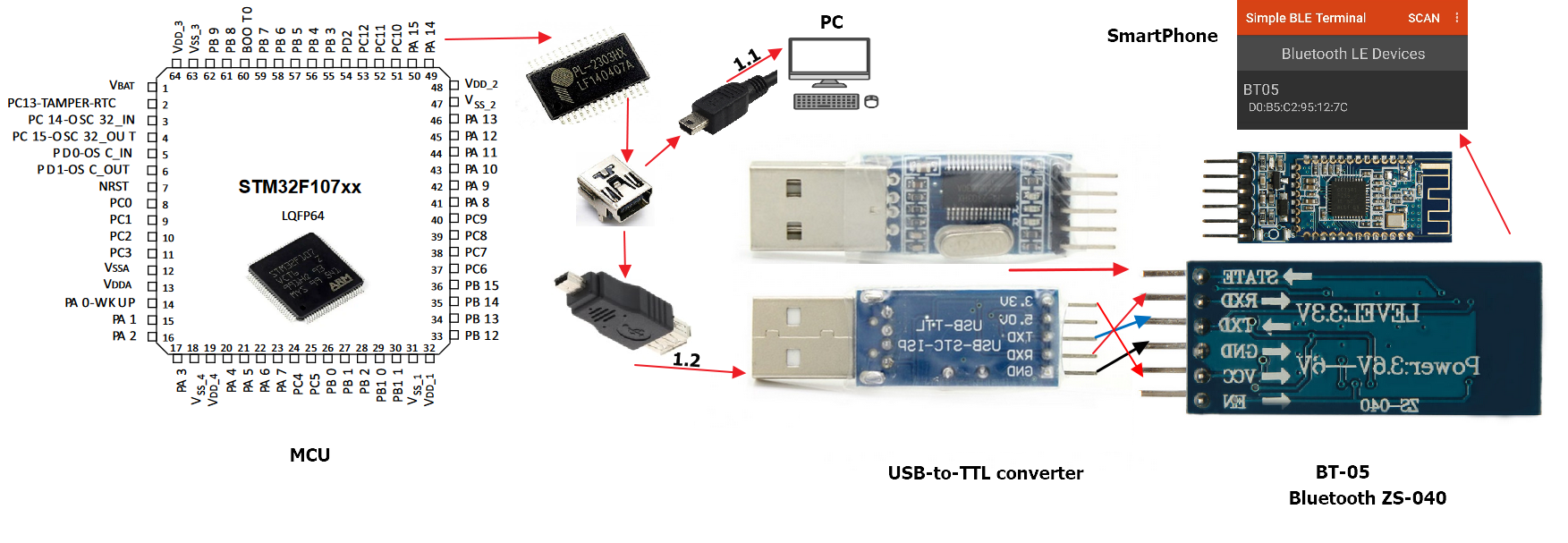
- How to wiring between USB-to-TTL converter and Bluetooth (BT-05 or ZS-040)
USB-to-TTL converter TX <-> TX : Bluetooth
USB-to-TTL converter RX <-> RX : Bluetooth
USB-to-TTL converter GND <-> TX : Bluetooth
USB-to-TTL converter 3.3V <-> VCC_IN: Bluetooth

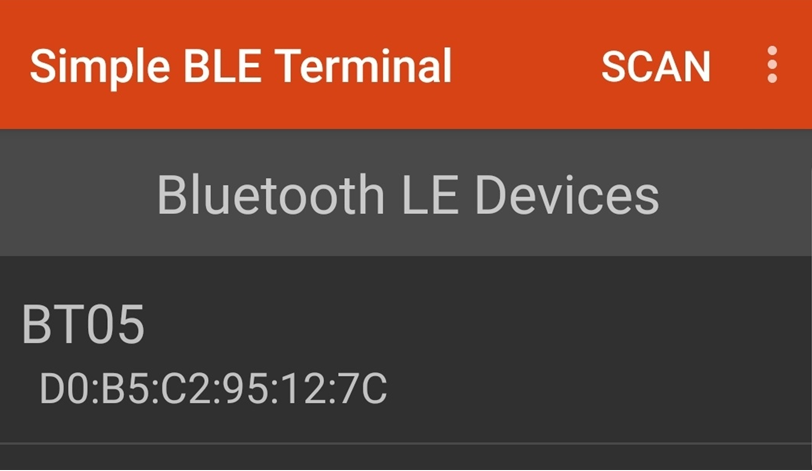
reference:
https://community.st.com/s/question/0D50X00009XkbKoSAJ/stm32f107
STM32F107
community.st.com
https://blog.yavilevich.com/2017/03/mlt-bt05-ble-module-a-clone-of-a-clone/
MLT-BT05 BLE module – a clone of a clone?? | Arik Yavilevich's blog
Previously I covered the HM-10 Bluetooth Low Energy (BLE) module and its clone, the CC41-A. Those are two popular modules that allow simple BLE communication through a serial interface and are handy with Arduinos and other hobby micro controllers. Make sur
blog.yavilevich.com
HC-06 vs. HC-05 Bluetooth Module: What is the difference between HC-06 and HC-05?
Hc-05 is a Bluetooth serial port module with master-slave integration. The master-slave can be switched with rich and complete instructions. Hc-06 is a Bluetooth serial port module with master-slave integration. The master-slave can be switched by command,
www.utmel.com
https://github.com/kai-morich/SimpleBluetoothLeTerminal
GitHub - kai-morich/SimpleBluetoothLeTerminal: Android terminal app for Bluetooth LE devices using custom serial profiles
Android terminal app for Bluetooth LE devices using custom serial profiles - GitHub - kai-morich/SimpleBluetoothLeTerminal: Android terminal app for Bluetooth LE devices using custom serial profiles
github.com
http://www.kai-morich.de/android/
Kai Morich's Android Apps
Serial Bluetooth Terminal
www.kai-morich.de
https://www.sparkfun.com/tutorials/215
RS-232 vs. TTL Serial Communication - SparkFun Electronics
Weekly product releases, special offers, and more.
www.sparkfun.com
https://blue-sea-whale.tistory.com/39
◈ HC-06 블루투스 모듈
블루투스 모듈이다. 매우저렴하게 쉽게 내 장비에 접속 활용이 가능하다. 간단한 무선 제어 장치가 필요할 때 적용하기에 적당하다. 스마트폰 어플로 블루투스 프로그램도 많기 때문에 간단한 R
blue-sea-whale.tistory.com
https://circuitdigest.com/microcontroller-projects/programming-stm32f103c8-board-using-usb-port
Programming STM32F103C8 Board using USB Port
The STM32 Development Board housing the STM32F103C8 Microcontroller is getting increasingly popular thanks to its ARM Cortex M3 architecture, it has high operational speed and more peripheral options. Also since, this board can be easily programmed u
circuitdigest.com
'board_android-IoT > STM32F' 카테고리의 다른 글
| STM32F103CBT6(128KB Flash) user flash write (1) | 2023.10.26 |
|---|---|
| Target is not responding, retrying (0) | 2023.10.21 |
| Keypad double click detect (0) | 2023.10.11 |
| STM32F107 외부 인터럽트 (0) | 2023.01.11 |
| STM32F Timer2 (TIM2) Init and run (0) | 2022.10.12 |