
'board_android-IoT'에 해당되는 글 87건
- 2021.08.24 :: ABOVE A31G112CL starter kit
- 2021.08.22 :: Arduino External Interrup + Button
- 2021.08.13 :: STM32 CPU and 7Segment interface
- 2021.07.19 :: KEIL MDK compiled code and RAM usage details
- 2021.07.19 :: [ W7500 / Link error ] Sections of aggregate size 0xc bytes could not fit into
- 2021.05.15 :: change priority on the default gateway from wired(eth0) to wifi(wlan0)
1. UART로 디버깅 메시지 출력관련
- 어느 UART로 출력하는지 ?
> UART1 인것 같은데 board의 어느 핀으로 나가는 건지 아니면 USB cable 로 PC로 연결된 COM port로 연결되는지?
2. DEMO example에서 FND예제는 다른 추가 장치(예. 7Segment) 가 있는지?
3. 보드사용매뉴얼이나 추가 문서의 위치 요청?
- 공식적인 페이지가 있는지(예. WIKI page ? )
- StarterKit 보드에 맞는 매뉴얼 .
> https://www.abov.co.kr/kr/sub03/sub03_1.php?ca_id=102010&it_id=1622694976
사이트명
설명 문구
www.abov.co.kr
★ debugging message
// print
_DBG( "PE0 ~ PE3 Output is High Level. \n\r" );
'board_android-IoT > ABOVE.A31G112CL' 카테고리의 다른 글
| UART interrupt and polling comparison (0) | 2021.09.20 |
|---|---|
| A31G112CL / A31G11x , Software Serial (TX only, for debugging , STM32) (0) | 2021.08.27 |
https://create.arduino.cc/projecthub/ronbentley1/button-switch-using-an-external-interrupt-7879df
Button Switch Using An External Interrupt
There are numerous examples of how to connect button switches via an external interrupt. This example offers an alternative approach. By ronbentley1.
create.arduino.cc
https://m.blog.naver.com/PostView.naver?isHttpsRedirect=true&blogId=yuyyulee&logNo=220310875023
[아두이노 강좌] 23. Interrupt(인터럽트) (3) - 인터럽트 함수 알아보기
지난 시간에 스위치를 누를 때마다 LED가 켜고 꺼지는 예제를 인터럽트를 이용한 소스로 구현해 봤었다....
blog.naver.com
https://learn.adafruit.com/adafruit-proto-shield-arduino?view=all
Adafruit Proto Shield for Arduino
This is a design for an open-source prototyping shield for Arduino NG/Diecimila. It has tons of cool features, to make prototyping on your Arduino easy.
learn.adafruit.com
http://www.martyncurrey.com/keypads/
Keypads and Button Switches on the Arduino | Martyn Currey
Digial keypad on the left. Analogue keypad on the right. When I first started building the dropController and the camController I could not find suitable navigation keypads, the ones I did find were expensive or not really suitable, so I built my own. Thes
www.martyncurrey.com
https://forum.arduino.cc/t/4x4-matrix-keypad-and-interrupt/460003
4x4 matrix keypad and interrupt
Hello, how can I exit a loop when I press the button ( 2 or 8 ) on the keypad. Is possible to using functions attachInterrupt()? I have ArduinoMega 2560. #include const byte ROWS = 4; const byte COLS = 4; char keys[ROWS][COLS] = { {'1','2','3'
forum.arduino.cc
https://circuitdigest.com/microcontroller-projects/arduino-interrupt-tutorial-with-examples
Arduino Interrupts Tutorial
Arduino Interrupts Tutorial
circuitdigest.com
https://forum.arduino.cc/t/keypad-without-keypad-library/656198/2
keypad without keypad library
Hello, I tried creating a code for a 4X4 keypad without the keypad library. Unfortunately it doesn’t perfectly work. I’m sure the witring is correct and it is normal if my pins are not in INPUT_PULLUP because I wired real resistors in my wiring. The bu
forum.arduino.cc
GPIO expander
https://m.blog.naver.com/PostView.naver?isHttpsRedirect=true&blogId=specialist0&logNo=220704124150
MCP23017 I/O Expander (STM32F051)
MCU를 사용하다가 입출력 포트가 부족할 때, I/O expander IC를 사용하면 입출력 포트를 늘릴 수 있...
blog.naver.com
'board_android-IoT > arduino_esp8266_esp32' 카테고리의 다른 글
| Conditional compile for ESP32 and ESP32S3 (0) | 2024.11.16 |
|---|---|
| Arduino - ADC voltage measurement using Aref (0) | 2023.06.15 |
| STM32 CPU and 7Segment interface (0) | 2021.08.13 |
| ESP8266-weather(temperature_humidity) station (0) | 2021.05.14 |
| MINIDK, ESP8266-weather(temperature_humidity) station (0) | 2021.05.05 |
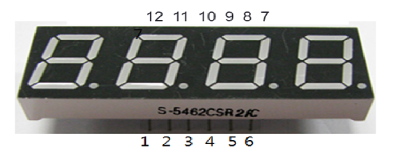
- 선연결 테스트용
https://create.arduino.cc/projecthub/SAnwandter1/programming-4-digit-7-segment-led-display-2d33f8
Programming 4 Digit 7 Segment LED Display
Writing in a 4 digit 7 segment LED display. By SAnwandter1.
create.arduino.cc
- 효율적인 프로그램 코딩용
https://popcorn16.tistory.com/164
[아두이노] 4자리 7세그먼트 사용법 및 예제 - 카운터, 스톱워치
[Arduino] 7세그먼트 기초 사용법 7세그먼트 사용법에 이은 4자리 7 Segment 기초 사용법 포스팅입니다. 아두이노 보드 구성, 숫자 9876을 표시하는 방법, 카운터 만들기, 스톱워치 만들기를 직접 해보
popcorn16.tistory.com

| Digit to display |
A | B | C | D | E | F | G |
| 0 | 1 | 1 | 1 | 1 | 1 | 1 | 0 |
| 1 | 0 | 1 | 1 | 0 | 0 | 0 | 0 |
| 2 | 1 | 1 | 0 | 1 | 1 | 0 | 1 |
| 3 | 1 | 1 | 1 | 1 | 0 | 0 | 1 |
| 4 | 0 | 1 | 1 | 0 | 0 | 1 | 1 |
| 5 | 1 | 0 | 1 | 1 | 0 | 1 | 1 |
| 6 | 1 | 0 | 1 | 1 | 1 | 1 | 1 |
| 7 | 1 | 1 | 1 | 0 | 0 | 0 | 0 |
| 8 | 1 | 1 | 1 | 1 | 1 | 1 | 1 |
| 9 | 1 | 1 | 1 | 1 | 0 | 1 | 1 |
| A | 1 | 1 | 1 | 0 | 1 | 1 | 1 |
| b | 0 | 0 | 1 | 1 | 1 | 1 | 1 |
| C | 1 | 0 | 0 | 1 | 1 | 1 | 0 |
| d | 0 | 1 | 1 | 1 | 1 | 0 | 1 |
| E | 1 | 0 | 0 | 1 | 1 | 1 | 1 |
| F | 1 | 0 | 0 | 0 | 1 | 1 | 1 |
// 핀 번호 선언
int pos_pins[] = {8,11,12,7}; // 몇번째 세그먼트
int num_of_pos = 4;
int pins[] = {9,13,5,3,2,10,6,4}; // 세그먼트 a, b, c, d, e, f, g, dp
int num_of_pins = 8;
int delaytime = 5;

// 세그먼트에 표시 할 숫자
bool segment[10][8] = {
  {true, true, true, true, true, true, false, false}, //0
  {false, true, true, false, false, false, false, false}, //1
  {true, true, false, true, true, false, true, false}, //2
  {true, true, true, true, false, false, true, false}, //3
  {false, true, true, false, false, true, true, false}, //4
  {true, false, true, true, false, true, true, false}, //5
  {true, false, true, true, true, true, true, false}, //6
  {true, true, true, false, false, false, false, false}, //7
  {true, true, true, true, true, true, true, false}, //8
  {true, true, true, true, false, true, true, false} //9
};

void setup() {
  for(int i=0; i<num_of_pos; i++) {
     pinMode(pos_pins[i], OUTPUT);
  }
  for(int i=0; i<num_of_pins; i++) {
    pinMode(pins[i], OUTPUT);
  }
}

void loop() {
  int num[] = {9, 8, 7, 6};
  digits_4_seven_segment(num);
}

// 원하는 위치에 표시되도록 set
void set_position(int pos){
  for(int i = 0; i < 4; i++) {
    if(i + 1 == pos){
      digitalWrite(pos_pins[i], LOW);
    } else {
      digitalWrite(pos_pins[i], HIGH);
    }
  }
}

// 원하는 숫자 표시
void set_number(int number){
  for(int i=0;i<num_of_pins;++i){
    segment[number][i] ? digitalWrite(pins[i], HIGH) : digitalWrite(pins[i], LOW);
  }
}

// 원하는 위치, 원하는 숫자를 표시
void set_seven_segment(int pos, int number){
  set_position(pos);
  set_number(number);
}

// 입력된 4자리 숫자를 세그먼트에 표시
void digits_4_seven_segment(int num[]){
  for(int i=0;i<num_of_pos;++i){
    set_seven_segment(i+1,num[i]);
    delay(delaytime);
  }
}
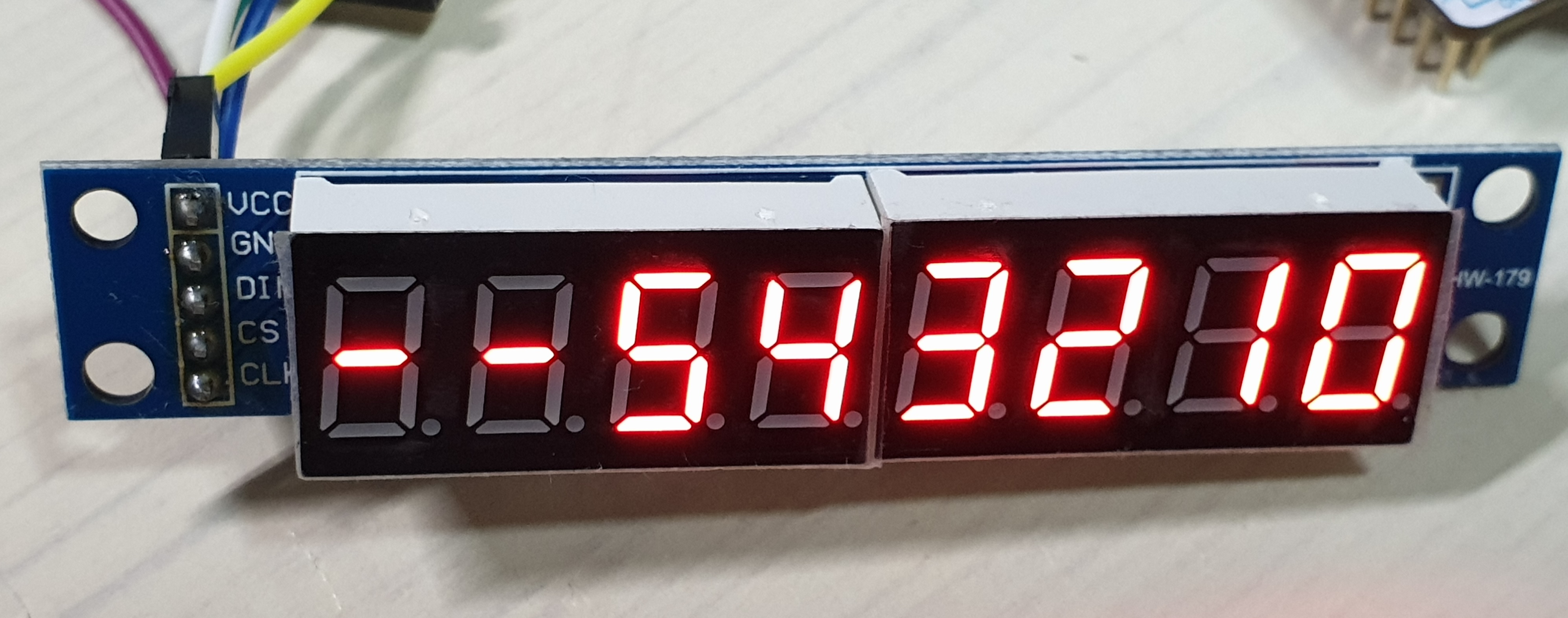
- 기타 SPI통신 이용:
STM32 - SPI통신 MAX7219 7-segment 모듈
통신 방법 : SPI (최대속도 : 10Mhz) 작동 전압 : 4.0~5.5 환경 : P-NUCLEO-WB55 개발 보드, Atollic TrueSTUDIO [동작] 16 비트 데이터 포맷 사용 (D15~D12 사용 X) D11~D8 ADDRESS(명령어 역할), D7~D0 DATA(M..
rs29.tistory.com
- Interfacing 7 segment display with stm32f103 microcontroller
https://www.engineersgarage.com/stm32-microcontroller-7-segment-interface/
Interfacing 7 segment display with stm32f103 microcontroller
This tutorial is about interfacing 7 segment led display with stm32 microcontroller using keil arm mdk 5 with stm32 HAL libraries for code compilation. Stm32cubemx is used to initialize the stm32f103c8t6 microcontroller peripherals/variables pins, operati
www.engineersgarage.com
'board_android-IoT > arduino_esp8266_esp32' 카테고리의 다른 글
| Conditional compile for ESP32 and ESP32S3 (0) | 2024.11.16 |
|---|---|
| Arduino - ADC voltage measurement using Aref (0) | 2023.06.15 |
| Arduino External Interrup + Button (0) | 2021.08.22 |
| ESP8266-weather(temperature_humidity) station (0) | 2021.05.14 |
| MINIDK, ESP8266-weather(temperature_humidity) station (0) | 2021.05.05 |
KEIL MDK compiled code and RAM usage details
#W7500 #KEIL #uVision #LinkError #Sectionsofaggregatesize0xcbytescouldnotfitinto
-> solution: decrease size of variable , ex: uint8_t SomeVariable[128] ;// 128 --> 120
Generally, MCU contains storage space: on-chip Flash and on-chip RAM, RAM is equivalent to memory, and Flash is equivalent to hard disk. The compiler divides a program into several parts and stores them in different memory areas of the MCU.
After the Keil project is compiled, there will be a prompt message about the space occupied by the corresponding program, as shown below:
Program Size: Code=12266 RO-data=790 RW-data=232 ZI-data=8096
- build result of SNMP firmware :
| Program Size: Code=36724 RO-data=4760 RW-data=7244 ZI-data=8972 |
The Program Size mentioned above contains the following parts:
1) Code: Code segment, which stores the code part of the program;
2) RO-data: read-only data segment, storing constants defined in the program;
3) RW-data: Read and write data segment, store global variables initialized to non-zero values;
4) ZI-data: 0 data segment, storing uninitialized global variables and variables initialized to 0;
After compiling the project, a .map file will be generated, which explains the size and address occupied by each function. The last few lines of the file also explain the relationship between the above several fields:
Total RO Size (Code + RO Data) 13056 ( 12.75kB)
Total RW Size (RW Data + ZI Data) 8328 ( 8.13kB)
Total ROM Size (Code + RO Data + RW Data) 13288 ( 12.98kB)
- Last part of Map file when SNMP firmware build :
| Total RO Size (Code + RO Data) 41484 ( 40.51kB) Total RW Size (RW Data + ZI Data) 16216 ( 15.84kB) Total ROM Size (Code + RO Data + RW Data) 42340 ( 41.35kB) |
1) RO Size includes Code and RO-data, indicating the size of the Flash space occupied by the program;
2) RW Size includes RW-data and ZI-data, indicating the size of RAM occupied during runtime;
3) ROM Size includes Code, RO Data, and RW Data, indicating the size of the Flash space occupied by the programming program.
Before the program runs, a file entity needs to be burned into the STM32 Flash, usually a bin or hex file. The burned file is called an executable image file. As shown in the left figure below, it is the memory distribution after the executable image file is burned to STM32. It contains two parts: the RO segment and the RW segment: the RO segment saves the data of Code and RO-data, and the RW segment saves The data of RW-data is not included in the image file because ZI-data is all 0.
STM32 is booted from Flash by default after power-on. After booting, the RW-data (initialized global variables) in the RW segment will be moved to RAM, but the RO segment will not be moved, that is, the execution code of the CPU is read from Flash. In addition, the ZI segment is allocated according to the ZI address and size given by the compiler, and this RAM area is cleared, as shown in the right figure below; the remaining RAM space is used as a dynamic memory heap.
'board_android-IoT > W7500_STM32' 카테고리의 다른 글
| [ W7500 / Link error ] Sections of aggregate size 0xc bytes could not fit into (0) | 2021.07.19 |
|---|
[ W7500 / Link error ] Sections of aggregate size 0xc bytes could not fit into
#STM32M0 #KEIL #uVision #LINKERROR #COULDNOTFITINTO #Sectionsofaggregatesize #ErrorL6407E
<BEFORE>
linking...
.\Obj\SNMPOOOOO_OOOO_OO.axf: Error: L6406E: No space in execution regions with .ANY selector matching main.o(.data).
.\Obj\SNMPOOOOO_OOOO_OO.axf: Error: L6406E: No space in execution regions with .ANY selector matching retarget.o(.data).
.\Obj\SNMPOOOOO_OOOO_OO.axf: Error: L6406E: No space in execution regions with .ANY selector matching main.o(.data).
.\Obj\SNMPOOOOO_OOOO_OO.axf: Error: L6407E: Sections of aggregate size 0xc bytes could not fit into .ANY selector(s).
<AFTER>
linking...
Program Size: Code=36900 RO-data=4528 RW-data=6820 ZI-data=8972
// map file
Total RO Size (Code + RO Data) 41428 ( 40.46kB)
Total RW Size (RW Data + ZI Data) 15792 ( 15.42kB)
Total ROM Size (Code + RO Data + RW Data) 42284 ( 41.29kB)
How to fix:
- decrease size in Variable declarations.
ex. uint8_t SomeVariable[256] ; // ex. 256 ->128
> above change makes RAM(RW size) size smaller. Then I can fix this problem 'could not fit into'.
*. https://developer.arm.com/documentation/ka002785/latest
Documentation – Arm Developer
developer.arm.com
- W7500 (coretex m0) memory map
http://wizwiki.net/wiki/lib/exe/fetch.php?media=products:w7500:overview:w7500_memory_map.png

'board_android-IoT > W7500_STM32' 카테고리의 다른 글
| KEIL MDK compiled code and RAM usage details (0) | 2021.07.19 |
|---|
라즈베리파이의 네트워크 우선순위를 무선우선으로 변경할때
change network routing priority to wifi (first)
https://www.raspberrypi.org/forums/viewtopic.php?t=278033
Change priority on the default gateway from eth0 to wlan0 - Raspberry Pi Forums
Mon Jun 22, 2020 3:12 pm Hello! I'm having "problems" with my Rpi 4 connection. Well, more than problems is that I think there's something I don't understand. So the thing is that I have my Rpi connected to both wired network with eth0 interface and wirele
www.raspberrypi.org
'board_android-IoT > raspberry_pi3' 카테고리의 다른 글
| Raspberry Pi3 HDMI to TV monitor overscan (0) | 2020.08.12 |
|---|---|
| PyQt for raspberian (0) | 2020.07.16 |
| Raspberry pi Tablet comparison (0) | 2020.05.26 |
| Raspberry pi + Korean Language + IME setting (0) | 2020.05.24 |
| 라즈베리파이 아날로그핀으로 20V 입력받는 방법 (0) | 2020.05.21 |